-

- gyl_lucy 2022-03-13
三、https://www.npmjs.com中搜索html-webpack-plugin可以看到对插件的详细解释
四、path:输出的时候把所有文件都放到合格目录下
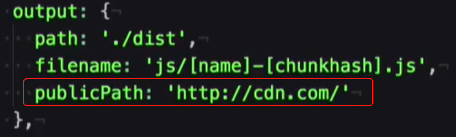
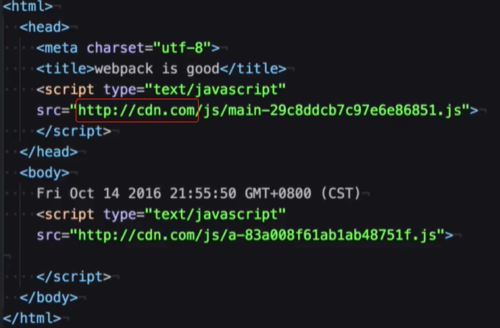
publicPath:占位符,需要上线,设置时,如果设置为http://cdn.com,这样js的路径就会替换为绝对地址以http://cdn.com开头的路径,这样就能满足上线需求了。
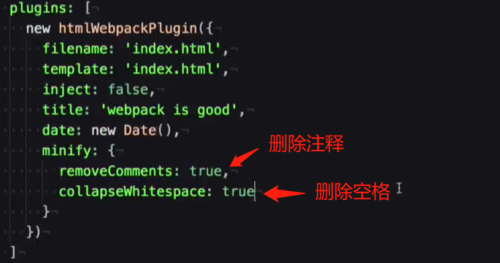
五、minify,对上线的html进行压缩- 0赞 · 0采集
-

- 慕莱坞7063763 2021-02-23
设置打包压缩规则
- 0赞 · 0采集
-
- 慕莱坞7063763 2021-02-23
打包路径修改,若不设置publicPath则使用相对路径
- 0赞 · 0采集
-
- 慕莱坞7063763 2021-02-23
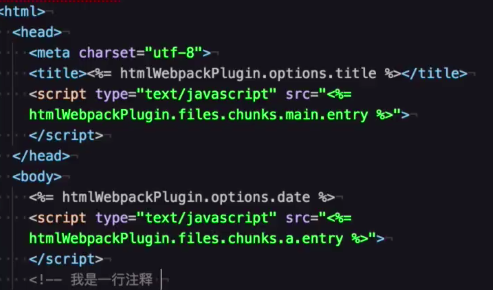
html文件中直接使用htmlWebpackPlugin
htmlWebpackPlugin.files:获取打包后的文件信息
htmlWebpackPlugin.options:获取package.json中htmlWebpackPlugin的全部属性
注意:通过这种方式注入js引用,应将inject改为false,否则引用文件会重复生成。
-
截图0赞 · 0采集
-

- RaysLiu 2020-06-23
publicpath
-
截图0赞 · 0采集
-
- RaysLiu 2020-06-23
遍历 htmlwebpackplugin 上的key value
- 0赞 · 0采集
-

- 雪豹1993 2020-01-22
const path = require('path'); const HtmlWebpackPlugin = require('html-webpack-plugin'); const { CleanWebpackPlugin } = require('clean-webpack-plugin'); module.exports = { entry: { app: './src/index.js', print: './src/print.js' }, plugins: [ new CleanWebpackPlugin(), new HtmlWebpackPlugin({ title: 'Output Management', inject: 'head', // 压缩 minify: { // 删除注释 removeComments: true, // 去除空格 collapseWhitespace: true } }) ], output: { filename: 'js/[name].bundle.js', path: path.resolve(__dirname, 'dist'), publicPath: 'http://cdn.com' } };- 1赞 · 0采集
-
- 雪豹1993 2020-01-22
const path = require('path'); const HtmlWebpackPlugin = require('html-webpack-plugin'); const { CleanWebpackPlugin } = require('clean-webpack-plugin'); module.exports = { entry: { app: './src/index.js', print: './src/print.js' }, plugins: [ new CleanWebpackPlugin(), new HtmlWebpackPlugin({ title: 'Output Management', inject: 'head' }) ], output: { filename: 'js/[name].bundle.js', path: path.resolve(__dirname, 'dist'), // 可以为生产环境地址,执行npm run build命令之后,dist目录下 index.html中的js路径会加上这个前缀 publicPath: 'http://cdn.com' } };-
截图0赞 · 0采集
-

- tp_ysu 2020-01-15
<%= %> 有等号直接取值,没有等号直接运行js代码
- 0赞 · 0采集
-

- qq_幻雨焉缘_0 2019-08-12
如果想通过 htnlWebpackPlugin 向模板文件传递参数的话 直接 实例中命名 title 然后在模板的任何地方 使用jsp语法
<%= htmlWebpackPlugin.option.title %>
htmlWebpackPlugin.option.param 来获取参数
- 1赞 · 0采集
-
- qq_幻雨焉缘_0 2019-08-12
<%= %> jsp的表达式
- 0赞 · 0采集
-
- qq_幻雨焉缘_0 2019-08-12
htmlWebpackPlugin 插件 需要在plugins 中实例
参数有
filename 打包之后的文件名
template 打包的模板文件
inject 打包的js在文档中的部分 head body
- 0赞 · 0采集
-

- rlman 2019-03-03
使用:
1、在webpack.config.js里配置entry,output。
const path = require('path')
var htmlWebpackPlugin = require('html-webpack-plugin’)//用于生成html文件
module.exports = {
mode: "development",
entry: {//入口
page1: path.resolve(__dirname, 'src/index.js'),
page2: path.resolve(__dirname, 'src/a.js'),
},
output: {//出口,即打包到哪个文件夹,打包后叫什么名字
path: path.resolve(__dirname, 'dist’),//要写成绝对路径
filename: 'js/[name].js’//可通过占位符如[name]\[hash]\[chunkhash]来区别不同的打包文件名
},
plugins: [
new htmlWebpackPlugin({
template:'index.html’,//使用哪个html模版
filename:'index.html’,//打包后生成的html文件名
title:'hello world' //可向模版传参,模版通过ejs写法获取展示,<%=%>
})
],
}
- 0赞 · 1采集
-

- 朱小妞 2019-02-23
压缩,删除注视,空格
html-webpack-plugin
npmjs.com查询官网,查看详细注释

- 0赞 · 0采集
-

- 慕仰0906943 2018-08-30
可以在html文件中显示插件中特定的数据

 最后在生成的index.html文件中相应的位置就会天上相应的插件中定义的数据
- 0赞 · 0采集
-

- qq_我不想睡觉_0 2018-07-25
template:将dist下的html文件和根目录下的html文件联系起来
<script src="<%= %>"></script>
htmlWebpackPlugin.files.chunks.main.entry
拿到被打包后的main文件的路径
- 0赞 · 0采集
-
- qq_我不想睡觉_0 2018-07-25
minify 属性对当前文件进行压缩
- 0赞 · 0采集
-

- 阳夕 2018-05-05
webpack 配置文件:添加 title: 'webpack is cool'
自定义 html 模版文件:使用 ejs 模版
<% 'Scriptlet' tag, for control-flow, no output
<% %> 控制流
<%= Outputs the value into the template (HTML escaped)
<%= %> 转义输出
<%= htmlWebpackPlugins.options.title %> title 定义在 option 之下
- 0赞 · 0采集
-

- qq_击石原有火_03828381 2018-04-09
上线配置
-
截图0赞 · 0采集
-

- dabear 2018-03-30
上线地址 output.publicPath
在html中所引用的js路径 被替换为以publicPath开头的绝对路径
上线前压缩html文件 plugins->htmlWebpackPlugin->minify(很多参数)
https://github.com/kangax/html-minifier#options-quick-reference
minify: {
removeComments: true, // 删除注释
collapseWhitespace: true // 删除空格
}
-
截图0赞 · 0采集
-
- dabear 2018-03-30
在自定义的 html 模版文件中使用 ejs 自定义了引用输出 js 的地方(在head或body引入类似:<script src='<%= htmlWebpackPlugin.files.chunks.main.entry %>'></script>)
因此需要将 inject 设置为 false(默认为 true),避免打包资源的引入混乱
-
截图0赞 · 0采集
-
- dabear 2018-03-29
通过自定义 html 模版,根据 htmlWebpackPlugin.files.chunks.(filename).entry 自定义输出模块的插入地方(head/body)
-
截图0赞 · 0采集
-
- dabear 2018-03-29
htmlWebpackPlugin.files 输出 chunks需要打包的模块(main/a) css输出的样式文件数组 js输出的脚本文件数组;
其中 chunks 中的 模块 .entry 属性,可以获取输出的文件路径
-
截图0赞 · 0采集
-
- dabear 2018-03-29
遍历 htmlWebpackPlugin -> files、options
遍历 htmlWebpackPlugin.files、htmlWebpackPlugin.options
可能值是对象/数组 JSON.stringify
-
截图0赞 · 0采集
-
- dabear 2018-03-29
new htmlWebpackPlugin({
	filename: 'index.html',
	template: 'index.html',
	inject: 'head',
	title: 'webpack is cool~',
	date: new Date()
})
webpack 配置文件:添加 title: 'webpack is cool'
自定义 html 模版文件:使用 ejs 模版
<% 'Scriptlet' tag, for control-flow, no output
<% %> 控制流
<%= Outputs the value into the template (HTML escaped)
<%= %> 转义输出
<%= htmlWebpackPlugins.options.title %> title 定义在 option 之下
-
截图0赞 · 0采集
-

- 亅毛毛醬園滾滾 2018-03-27
在html调用对应的js
-
截图0赞 · 0采集
-

- MrYanZy 2018-03-08
- minify压缩代码
-
截图0赞 · 0采集
-
- MrYanZy 2018-03-08
- output下的publicPath,满足线上地址的需求
-
截图0赞 · 0采集
-
- MrYanZy 2018-03-08
- 在html中执行js逻辑<%= %>
-
截图0赞 · 0采集
-
- MrYanZy 2018-03-08
- <%= htmlWepackPlugin.options.title%> 参数替换设置参数
-
截图0赞 · 0采集
