-

- 慕勒1467557 2020-04-11
动态方法调用:实现一个action对应多个请求的处理,避免创建太多的action。有3种方式:指定method属性、感叹号方式(官方不推荐的方式,需要开启常量struts.enable.DynamicMethodInvocation)、通配符方式(官方推荐使用的方式,用到*和{1}进行匹配)
- 0赞 · 0采集
-

- 程序员慕虎 2019-10-20
动态方法调用
动态方法调用就是为了解决一个Action对应多个请求的处理,以免Action太多。
1、指定method属性
<action name="addaction" method="add" class="com.action.HelloWorldAction">
    <result name="success">/index.jsp</result>
</action>
2、感叹号方式
<constant name="struts.enable.DynamicMethodInvocation" value="true"></constant>
//指定方法返回视图
public String add(){
    return "add";
}
//struts配置多个result,指定name对应的
视图名称
<result>/index.jsp</result>
<result name="add">/index.jsp</result>
<result name="update">/update.jsp</result>
访问方式:/helloworld!(方法名).action
3、通配符方式
<action name="helloworld_*" method="{1}" class="com.action.HelloWorldAction"> <result>/index.jsp</result> <result name="add">/{1}.jsp</result> <result name="update">/{1}.jsp</result> </action> <action name="*_*" method="{2}" class="com.action.{1}Action"> <result>/index.jsp</result> <result name="add">/{2}.jsp</result> <result name="update">/{2}.jsp</result> </action>- 0赞 · 0采集
-

- SongNeil熊 2019-09-11
动态方法调用
-
截图0赞 · 0采集
-

- 小段 2019-06-18
通配符action
-
截图0赞 · 0采集
-
- 小段 2019-06-18
动态方法属性
-
截图0赞 · 0采集
-

- 如_是 2019-06-03
Action的搜索顺序
-
截图0赞 · 0采集
-

- 大鹏111 2019-05-08
动态方法调用:解决一个Action对应多个请求,以免Action太多。
方法一:指定method属性。
编写多个action标签,编写多个name和method属性。
方法二:感叹号方式。(官方不推荐)
步骤1:开启常量值——<constant name="struts.enable.DynamicMethodInvocation" value="true"></constant>
步骤二:<action>标签里不写method属性,访问方式——http://localhost:8080/项目名/action名+!+方法名.action
方法三:通配符方式。(官方推荐使用)
- 0赞 · 0采集
-

- qq_慕哥4476554 2019-03-24
Struts2动态方法调用
1. 通过method 指定方法
2. 使用! 例如: http:localhost:8080/Struts/helloworld!add.action
必须设置<constant name="struts.enable.DynamicMethodInvocation" value="true"></constant>
3.使用通配符 * (推荐使用)
例如:<action name="helloworld_*_*" method="{1}" class="xxx">
<result name="{1}">{1}.jsp</result>
</action>
- 0赞 · 1采集
-

- 有一种成熟叫认怂 2019-03-05
struts2.5 为了增加安全性,在 struts.xml 添加了这么个属性:<global-allowed-methods>regex:.*</global-allowed-methods>
即
<package name="default" namespace="/" extends="struts-default">
<global-allowed-methods>regex:.*</global-allowed-methods>
<action name="helloworld" class="com.imooc.action.HelloWorldAction">
<result>/result.jsp</result>
<result name="add">/add.jsp</result>
<result name="update">/update.jsp</result>
</action>- 1赞 · 0采集
-
- nimazhihai 2018-10-22
动态方法调用:动态方法调用是为了解决一个Action对应多个请求的处理,以免Action太多。 三种方式:指定method属性、感叹号方式、通配符 1:繁杂不建议用(struts2.xml指明那个action执行那个method=add) <action name="add" method="add" class="com.Action.hellowAction"> <action name="update" method="update" class="com.Action.hellowAction"> 2:不建议用(!后接执行方法) <constant name="struts.enable.DynamicMethodInvocation" value="true"> </constant> <action name="hellowword" class="com.Action.hellowAction"> <result >/result.jsp</result> <result name="add">/add.jsp</result> <result name="update">/update.jsp</result> </action> http://localhost:8080/struts_hellowworld/aaa/hellowworld!xxx.action http://localhost:8080/struts_hellowworld/aaa/hellowworld!add.action http://localhost:8080/struts_hellowworld/aaa/hellowworld!update.action 3:常用的动态方法调用 (第一个*代表{1}第二个*={2}....) <constant name="struts.enable.DynamicMethodInvocation" value="false"> </constant> <action name="*_*" method="{2}" class="com.Action.{1}Action"> <result >/{2}.jsp</result> <result name="add">/{2}.jsp</result> <result name="update">/{2}.jsp</result> </action> http://localhost:8080/struts_hellowworld/aaa/hellow_add.action http://localhost:8080/struts_hellowworld/aaa/hellow_update.action- 0赞 · 1采集
-

- 慕圣6698645 2018-08-24
动态方法调用就是为了解决一个Action对应多个请求的处理,以免Action太多
-
截图0赞 · 1采集
-

- qq_袮D影孑_03909390 2018-08-17
动态方法的调用
-
截图0赞 · 0采集
-

- x小佳方丈用飘柔 2018-08-07
这个方法我只是针对通配符使用的
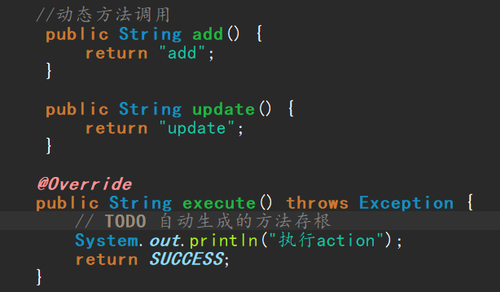
我看到视频里面两个方法好像都是return SUCCESS;所以改了url地址一直都无法跳转到其他两个页面,如果有和我一样的情况的同学可以把success改为"add"和"update",这样就没问题了
-
截图0赞 · 0采集
-

- 宇智波丶卡卡西 2018-07-08
使用通配符 方式进行 动态方法调用
其中 *_* *代表即将替换的类或者方法参数名
{1} {2} 代表对应*地方的值
-
截图0赞 · 0采集
-
- 宇智波丶卡卡西 2018-07-08
strtus2 动态调用某个类 某个方法 中
若要使用 感叹号方式,则需在xml 中配置一个属性
<constant name="struts.enable.DynamicMethodInvocation" value="true" />
-
截图0赞 · 0采集
-
- 宇智波丶卡卡西 2018-07-08
struts2 直接调用某个类的 具体某个方法的方式:
1、xml 中 配置 method 属性 对应 指定方法
2、感叹号方式 helloAction!aaaa.action
3、通配符方式
-
截图0赞 · 0采集
-

- BirdOfV 2018-06-13
@Struts2---动态方法调用
动态方法调用是为了解决一个Action对应多个请求的处理,以免Action太多。三种方式
1:指定method属性<action name="addAction" method="add" class="com.action.HelloWorldAction"> http://localhost:8080/struts2/aaa/addAction.action
2:感叹号方式
<constant name="struts.enable.DynamicMethodInvocation" value="true"></constant>
<action name="helloworld" class="com.action.HelloWorldAction">
      <result >/result.jsp</result>
      <result name="add">/add.jsp</result>
      <result name="update">/update.jsp</result>
</action>
http://localhost:8080/struts2/aaa/helloworld!add.action
3:通配符方式(推荐)
<action name="*_*_*" method="{2}" class="com.{3}.{1}Action"> <result >/{2}.jsp</result> <result name="add">/{2}.jsp</result> <result name="update">/{2}.jsp</result> </action> http://localhost:8080/struts2/aaa/HelloWorld_add_action.action-
截图0赞 · 1采集
-

- qq_王杰_3 2018-06-08
动态方法调用: 动态方法调用是为了解决一个Action对应多个请求的处理,以免Action太多。 三种方式:指定method属性、感叹号方式、通配符方式 1:<action name="add" method="add" class="com.Action.hellowAction"> 2:<constant name="struts.enable.DynamicMethodInvocation" value="false"> </constant> <action name="hellowword" class="com.Action.hellowAction"> <result >/result.jsp</result> <result name="add">/add.jsp</result> <result name="update">/update.jsp</result> </action> http://localhost:8080/struts_hellowworld/aaa/hellowworld!.action 3: <action name="*_*" method="{2}" class="com.Action.{1}Action"> <result >/{2}.jsp</result> <result name="add">/{2}.jsp</result> <result name="update">/{2}.jsp</result> </action> http://localhost:8080/struts_hellowworld/aaa/hellow_add.action
- 0赞 · 0采集
-

- 沫LML 2018-05-12
方法一
<action name="helloworld" class="com.imooc.action.HelloWorldAction">
<result>/result.jsp</result>
</action>
方法二
<constant name="struts.enable.DynamicMethodInvocation" value="true">
<action name="helloworld" class="com.imooc.action.HelloWorldAction">
<result>/result.jsp</result>
<result name="add">/add.jsp</result>
<result name="update">/update.jsp</result>
</action>
http://localhost:8080/hello/helloworld!update.action
方法三
<constant name="struts.enable.DynamicMethodInvocation" value="false">
<package name="default" namespace="/" extends="struts-default">
<action name="helloworld_*" method="{1}" class="com.imooc.action.HelloWorldAction">
<result>/result.jsp</result>
<result name="add">/{1}.jsp</result>
<result name="update">/{1}.jsp</result>
</action>
http://localhost:8080/hello/helloworld_update.action
- 0赞 · 0采集
-

- 加了糖的雪碧 2018-05-09
推荐使用通配符方式来实现动态方法调用。
1、一个通配符
<packgage name="default" namespace="/" extend="struts-defaullt">
<actiion name = "helloworld_*" method="{1}" class="..">
<result>/defult.jsp</result>
<result name="add">/{1}.jsp</result>
<result name="update">/{1}.jsp</result>
</action>
</packgage>
2、两个通配符
<package name="default" extends="struts-default" namespace="/" strict-method-invocation="false">
<action name="*_*" class="com.action.{1}Action" method="{2}">
<result >/result.jsp</result>
<result name="{2}">/{2}.jsp</result>
<result name="{2}">/{2}.jsp</result>
</action>
</package>
Struts2 2.5中默认是不开启通配符,需要将strict-method-invocation设置为false
即:
<package name="default" namespace="/" extends="struts-default" strict-method-invocation="false">
</package>
惊叹号方式调用方法时:
<packgage name="default" namespace="/" extend="struts-defaullt">
<actiion name = "helloworld" class="..">
<result>/defult.jsp</result>
<result name="add">/add.jsp</result>
<result name="update">/update.jsp</result>
</action>
</packgage>
- 0赞 · 0采集
-

- qq_杀意隆_0 2018-05-02
通配符方式:推荐使用
-
截图0赞 · 0采集
-
- qq_杀意隆_0 2018-05-02
感叹号调用方式
-
截图0赞 · 0采集
-
- qq_杀意隆_0 2018-05-02
返回的视图
-
截图0赞 · 0采集
-
- qq_杀意隆_0 2018-05-02
感叹号方式
-
截图0赞 · 0采集
-
- qq_杀意隆_0 2018-05-02
感叹号方式要开启这个常量
-
截图0赞 · 0采集
-
- qq_杀意隆_0 2018-05-02
action定义method属性已不推荐
-
截图0赞 · 0采集
-
- qq_杀意隆_0 2018-05-02
action标签用method属性
-
截图0赞 · 0采集
-
- qq_杀意隆_0 2018-05-02
动态方法调用:一个action对应多个请求
指定method属性
感叹号方式
通配符方式
-
截图0赞 · 0采集
-

- qq_小坏_4 2018-05-01
第一种根据多种action 进入想要的action
-
截图0赞 · 0采集
-

- 慕粉1469778809 2018-04-29
推荐使用通配符方式来实现动态方法调用。
<packgage name="default" namespace="/" extend="struts-defaullt">
<actiion name = "helloworld_*" method="{1}" class="..">
<result>/defult.jsp</result>
<result name="add">/{1}.jsp</result>
<result name="update">/{1}.jsp</result>
</action>
</packgage>
- 0赞 · 0采集
