

一、项目说明
使用SpringBoot结合谷歌的验证码生成工具(https://github.com/penggle/kaptcha)来生成登录验证码,通过配置不同的类型,来生成不同的验证码。通常在登录验证的时候,使用的比较多,在这里提供一个简单的demo仅供参考。
二、项目结构
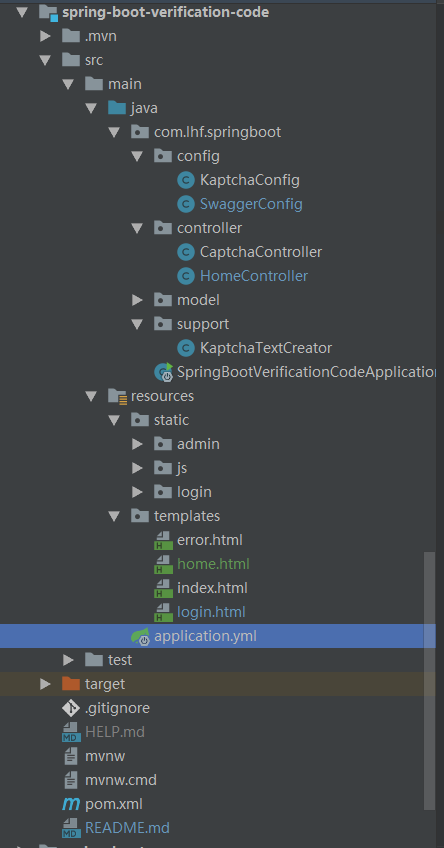
三、项目依赖配置
pom.xml文件配置如下:
<dependency>
    <groupId>org.springframework.boot</groupId>
    <artifactId>spring-boot-starter-thymeleaf</artifactId>
</dependency>
<dependency>
    <groupId>org.springframework.boot</groupId>
    <artifactId>spring-boot-starter-web</artifactId>
</dependency>

<!-- google验证码 -->
<dependency>
    <groupId>com.github.penggle</groupId>
    <artifactId>kaptcha</artifactId>
    <version>2.3.2</version>
</dependency>
属性文件配置:
server:
  port: 8092

spring:
  mvc:   #静态文件
    static-path-pattern: /static/**
  thymeleaf:
    model: HTML5
    prefix: classpath:/templates/
    suffix: .html
四、项目核心代码
1. 后端
(1)KaptchaConfig.java——谷歌验证码配置文件
package com.lhf.springboot.config;

import com.google.code.kaptcha.impl.DefaultKaptcha;
import com.google.code.kaptcha.util.Config;
import org.springframework.context.annotation.Bean;
import org.springframework.context.annotation.Configuration;

import java.util.Properties;

/**
 * @ClassName: KaptchaConfig
 * @Author: liuhefei
 * @Description: 谷歌验证码配置文件
 */
@Configuration
public class KaptchaConfig {

    @Bean(name = "captchaProducer")
    public DefaultKaptcha getKaptchaBean()
    {
        DefaultKaptcha defaultKaptcha = new DefaultKaptcha();
        Properties properties = new Properties();
        properties.setProperty("kaptcha.border", "yes");
        properties.setProperty("kaptcha.border.color", "105,179,90");
        properties.setProperty("kaptcha.textproducer.font.color", "blue");
        properties.setProperty("kaptcha.image.width", "160");
        properties.setProperty("kaptcha.image.height", "60");
        properties.setProperty("kaptcha.textproducer.font.size", "28");
        properties.setProperty("kaptcha.session.key", "kaptchaCode");
        properties.setProperty("kaptcha.textproducer.char.spac", "35");
        properties.setProperty("kaptcha.textproducer.char.length", "5");
        properties.setProperty("kaptcha.textproducer.font.names", "Arial,Courier");
        properties.setProperty("kaptcha.noise.color", "white");
        Config config = new Config(properties);
        defaultKaptcha.setConfig(config);
        return defaultKaptcha;
    }

    @Bean(name = "captchaProducerMath")
    public DefaultKaptcha getKaptchaBeanMath()
    {
        DefaultKaptcha defaultKaptcha = new DefaultKaptcha();
        Properties properties = new Properties();
        properties.setProperty("kaptcha.border", "yes");
        properties.setProperty("kaptcha.border.color", "105,179,90");
        properties.setProperty("kaptcha.textproducer.font.color", "blue");
        properties.setProperty("kaptcha.image.width", "100");
        properties.setProperty("kaptcha.image.height", "30");
        properties.setProperty("kaptcha.textproducer.font.size", "30");
        properties.setProperty("kaptcha.session.key", "kaptchaCodeMath");
        properties.setProperty("kaptcha.textproducer.impl", "com.lhf.springboot.support.KaptchaTextCreator");
        properties.setProperty("kaptcha.textproducer.char.spac", "5");
        properties.setProperty("kaptcha.textproducer.char.length", "6");
        properties.setProperty("kaptcha.textproducer.font.names", "Arial,Courier");
        properties.setProperty("kaptcha.noise.color", "white");
        properties.setProperty("kaptcha.noise.impl", "com.google.code.kaptcha.impl.NoNoise");
        properties.setProperty("kaptcha.obscurificator.impl", "com.google.code.kaptcha.impl.ShadowGimpy");
        Config config = new Config(properties);
        defaultKaptcha.setConfig(config);
        return defaultKaptcha;
    }
}
(2)KaptchaTextCreator.java——验证码文本生成器
package com.lhf.springboot.support;

import com.google.code.kaptcha.text.impl.DefaultTextCreator;

import java.util.Random;

/**
 * @ClassName: KaptchaTextCreator
 * @Author: liuhefei
 * @Description: 验证码文本生成器
 */
public class KaptchaTextCreator extends DefaultTextCreator {

    private static final String[] CNUMBERS = "0,1,2,3,4,5,6,7,8,9,10".split(",");

    @Override
    public String getText()
    {
        Integer result = 0;
        Random random = new Random();
        int x = random.nextInt(10);
        int y = random.nextInt(10);
        StringBuilder suChinese = new StringBuilder();
        int randomoperands = (int) Math.round(Math.random() * 2);
        if (randomoperands == 0)
        {
            result = x * y;
            suChinese.append(CNUMBERS[x]);
            suChinese.append("*");
            suChinese.append(CNUMBERS[y]);
        }
        else if (randomoperands == 1)
        {
            if (!(x == 0) && y % x == 0)
            {
                result = y / x;
                suChinese.append(CNUMBERS[y]);
                suChinese.append("/");
                suChinese.append(CNUMBERS[x]);
            }
            else
            {
                result = x + y;
                suChinese.append(CNUMBERS[x]);
                suChinese.append("+");
                suChinese.append(CNUMBERS[y]);
            }
        }
        else if (randomoperands == 2)
        {
            if (x >= y)
            {
                result = x - y;
                suChinese.append(CNUMBERS[x]);
                suChinese.append("-");
                suChinese.append(CNUMBERS[y]);
            }
            else
            {
                result = y - x;
                suChinese.append(CNUMBERS[y]);
                suChinese.append("-");
                suChinese.append(CNUMBERS[x]);
            }
        }
        else
        {
            result = x + y;
            suChinese.append(CNUMBERS[x]);
            suChinese.append("+");
            suChinese.append(CNUMBERS[y]);
        }
        suChinese.append("=?@" + result);
        return suChinese.toString();
    }


}
(3)CaptchaController.java——验证码生成控制器
package com.lhf.springboot.controller;

import com.google.code.kaptcha.Constants;
import com.google.code.kaptcha.Producer;
import io.swagger.annotations.Api;
import org.springframework.beans.factory.annotation.Autowired;
import org.springframework.stereotype.Controller;
import org.springframework.web.bind.annotation.GetMapping;
import org.springframework.web.bind.annotation.RequestMapping;
import org.springframework.web.servlet.ModelAndView;

import javax.imageio.ImageIO;
import javax.servlet.ServletOutputStream;
import javax.servlet.http.HttpServletRequest;
import javax.servlet.http.HttpServletResponse;
import javax.servlet.http.HttpSession;
import java.awt.image.BufferedImage;
import java.io.IOException;

/**
 * @ClassName: CaptchaController
 * @Author: liuhefei
 * @Description: 验证码生成控制器
 */
@Controller
@Api(value = "验证码")
@RequestMapping("/captcha")
public class CaptchaController {

    @Autowired
    private Producer captchaProducer;

    @Autowired
    private Producer captchaProducerMath;

    /**
     * 验证码生成
     */
    @GetMapping(value = "/captchaImage")
    public ModelAndView getKaptchaImage(HttpServletRequest request, HttpServletResponse response)
    {
        ServletOutputStream out = null;
        try
        {
            HttpSession session = request.getSession();
            response.setDateHeader("Expires", 0);
            response.setHeader("Cache-Control", "no-store, no-cache, must-revalidate");
            response.addHeader("Cache-Control", "post-check=0, pre-check=0");
            response.setHeader("Pragma", "no-cache");
            response.setContentType("image/jpeg");

            String type = request.getParameter("type");
            String capStr = null;
            String code = null;
            BufferedImage bi = null;
            if ("math".equals(type))//验证码为算数 8*9 类型
            {
                String capText = captchaProducerMath.createText();
                capStr = capText.substring(0, capText.lastIndexOf("@"));
                code = capText.substring(capText.lastIndexOf("@") + 1);
                bi = captchaProducerMath.createImage(capStr);
            }
            else if ("char".equals(type))//验证码为 abcd类型
            {
                capStr = code = captchaProducer.createText();
                bi = captchaProducer.createImage(capStr);
            }
            session.setAttribute(Constants.KAPTCHA_SESSION_KEY, code);
            out = response.getOutputStream();
            ImageIO.write(bi, "jpg", out);
            System.out.println("bi = " + bi);
            System.out.println("out =" + out);
            out.flush();

        }
        catch (Exception e)
        {
            e.printStackTrace();
        }
        finally
        {
            try
            {
                if (out != null)
                {
                    out.close();
                }
            }
            catch (IOException e)
            {
                e.printStackTrace();
            }
        }
        return null;
    }
}
(4)HomeController.java——前端页面入口控制器
package com.lhf.springboot.controller;

import com.google.code.kaptcha.Constants;
import com.lhf.springboot.model.User;
import io.swagger.annotations.ApiOperation;
import org.springframework.stereotype.Controller;
import org.springframework.ui.Model;
import org.springframework.web.bind.annotation.GetMapping;
import org.springframework.web.bind.annotation.PostMapping;
import org.springframework.web.servlet.ModelAndView;
import org.springframework.web.servlet.mvc.support.RedirectAttributes;

import javax.servlet.http.HttpServletRequest;

/**
 * @ClassName: HomeController
 * @Author: liuhefei
 * @Description: TODD
 */
@Controller
public class HomeController {

    /**
     * 请求到登陆界面
     * http://localhost:8092/home
     * @param request
     * @return
     */
    @ApiOperation(value="请求到登陆界面",notes="请求到登陆界面")
    @GetMapping("/home")
    public String home(HttpServletRequest request, Model model) {

        //登录逻辑
        System.out.println("验证码.....");
        return "home";
    }

    @PostMapping("home")
    public ModelAndView home( String code, RedirectAttributes redirectAttributes,  Model model, HttpServletRequest request) {
        ModelAndView view =new ModelAndView();
        String scode = (String)request.getSession().getAttribute(Constants.KAPTCHA_SESSION_KEY);

        System.out.println("code = " + code );
        System.out.println("scode = " + scode);


        if (!code.equals(scode)){
            //跳转到 get请求的登陆方法
            view.setViewName("error");
            return view;
        }
        //跳转到 get请求的登陆方法
        view.setViewName("home");
        return view;

    }

}
2. 前端
home.html
<!DOCTYPE html>
<html lang="en" xmlns:th="http://www.thymeleaf.org">
<head>
    <meta charset="UTF-8">
    <title>Title</title>
    <script type="text/javascript" src="static/login/js/jquery-1.5.1.min.js"></script>
</head>
<body>
<form th:action="@{/home}"  method="post" id="loginForm">

    <div class="form-actions">
        <div style="width:86%;padding-left:8%;padding-top: 40px;">

            <div style="float: left;width:100px; height: 40px;" >
                <i><img style="height:40px;" id="codeImg1" alt="点击更换" title="点击更换" src="captcha/captchaImage?type=char" /></i>
            </div>

            <br/><br/><br/>
            <div style="float: left;width:100px; height: 40px;" >
                <i><img style="height:40px;" id="codeImg2" alt="点击更换" title="点击更换" src="captcha/captchaImage?type=math" /></i>
            </div>
        </div>
    </div>
</form>
<!-- 软键盘控件end -->
<script type="text/javascript">
 var message="[[${message}]]";
 if(""!=message){
        layer.msg(message, {
            time: 3000
 })
    }
    $('#codeImg1').click(function() {
        var url ="captcha/captchaImage?type=char&s=" + Math.random();
 $("#codeImg1").attr("src", url);
 });
 $('#codeImg2').click(function() {
        var url ="captcha/captchaImage?type=math&s=" + Math.random();
 $("#codeImg2").attr("src", url);
 });

 function severCheck(){
        $("#loginForm").submit();
 }
    //session获取iframe处理
 $(function () {
        //判断一下当前是不是做顶层,如果不是,则做一下顶层页面重定向
 if (window != top) {
            top.location.href = location.href;
 }
    });
</script>
</body>
</html>
通过修改前端代码,实现算术或字符串验证码,前端代码如下:
<div style="float: left;">
   <i><img style="height:28px;" id="codeImg" alt="点击更换" title="点击更换" src="captcha/captchaImage?type=char" /></i>
</div>
其中type取值如下:
1. type=math : 验证码为算术类型
2. type=char : 验证码为字符串类型
其他代码文件不是重点,不在列举
五、项目运行效果
启动项目,访问:http://localhost:8092/home 效果如下:
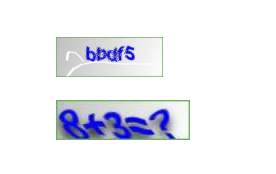
后续完整代码将会开源处理,如果有急需的可以联系我,私发!
发文不易,如果喜欢,请点个赞,感谢诸君的支持!


 随时随地看视频


热门评论
-
慕九州21728422022-03-14 1
-

慕UI67552432021-10-13 0
查看全部评论能发下源码吗?
代码不能拷贝啊啊啊啊啊啊啊啊啊啊