有没有办法自动为图像添加渐变?
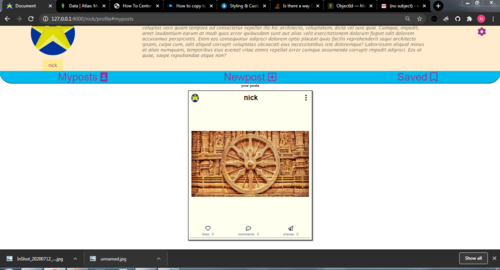
这是我的代码:
<div class='my-posts-container' id='<%=postobj._id%>'>
<%var menuid='menu'+postobj._id%>
<%var imagesource='../'+postobj.blob.path%>
<div class="my-posts-container-header">
<%-include('postheader.ejs',{friend:postobj.username,postid:postobj._id});%>
</div>
<div class="menu hide" id="<%=menuid%>" >
<ul >
<li><button onclick="viewpost('<%=postobj._id%>')" >view</button></li>
<li><button onclick="removepost('<%=postobj._id%>')" >remove</button></li>
<!-- <li><button onclick="copypostlink('<%=postobj._id%>')" >copy link</button></li>
<li><button onclick="editthispost('<%=postobj._id%>')" >edit</button></li> -->
</ul>
</div>
<div class="post-image" >
<img src="<%=imagesource%>" alt="image" height="400px" width="400px" style="margin: 5px;object-fit: contain;" ondblclick="like('<%=postobj._id%>')">
</div>
<span>
<%-include('likecommentsharesave.ejs',{postid:postobj._id,username:username,likes:postobj.likes})%>
</span>
<hr>
<div class="caption">
<%=postobj.caption%>
</div>
我想将图像大小保持为 400px *400px 但添加背景颜色 .post_image div,基本上,我想根据图像标签中的任何图像向背景添加渐变,如下所示,

这样可以覆盖整个 400 X 400 尺寸是否可以实现,如果不能,您能否建议我其他选择,谢谢。
 繁星淼淼
繁星淼淼2回答
-
有只小跳蛙
你可以用 CSS 实现类似的东西考虑使用这个样式表<style type="text/css"> .blured { width:320px; height:320px; position: relative; overflow: hidden; } .blured .blur { height:70px; width:100%; position:absolute; filter: blur(7px); } .blured .top { top:0px; background: linear-gradient(#000000d9, #00000000) } .blured .bottom { bottom:0px; background: linear-gradient(#00000000, #000000d9) }</style>然后使用以下标记<div class='blured' style='background-image:url("http://placekitten.com/320/320")'> <div class='blur top'></div> <div class='blur bottom'></div></div>结果将是这样的:您可以尝试使用linear-gradient颜色和值blur()来实现接近您要求的输出。 -

湖上湖
你描述的效果其实是可以实现的。您只需要在图像顶部堆叠尺寸较小的相同图像。然后可以模糊下面的图像,它将跨越该400px x 400px区域的其余部分。为此,您需要将position封闭的字段设置div为 ,relative并将两个图像的字段设置为absolute。我已将位于顶部的图像的高度降低到200px并保持图像宽度与下面的图像相同,以类似于问题中图像的样式。用于filter: blur()模糊较大的图像。模糊会柔化图像的边缘(删除该clip属性,您就会知道)。使用该clip属性使边缘看起来“清晰”。我用过这张图片。运行下面的代码片段以查看它的实际效果:<!DOCTYPE html><html><style>*{box-sizing: border-box;}.container { margin: auto; position: relative; width: 50%;}.outer { filter: blur(5px); position: absolute; z-index: -1; clip: rect(0,400px,400px,0); }.inner { position: absolute; top: 100px; }</style><div class="container"> <img src="https://i.stack.imgur.com/Y1ELT.jpg" class="outer" height="400px" width="400px"> <img src="https://i.stack.imgur.com/Y1ELT.jpg" class="inner" height="200px" width="400px"></div></html>这回答了你的部分问题。现在,要根据尺寸自动放置图像,您可以使用 JavaScript 检索和更新图像尺寸:var image = new Image();image.onload = function() { var height = image.height; var width = image.width;}image.src = "<source>";下面的图像将永远是400 x 400 px,您可以根据其实际检索到的尺寸更新顶部图像的属性,如果它小于400 x 400 px. 否则,将其压扁400 x 400 px以覆盖下面的整个图像。
 随时随地看视频慕课网APP
相关分类
 JavaScript