如何使用Core Animation创建自定义缓动功能?
我在iOS中很好地CALayer为CGPath(QuadCurve)设置了动画。但是我想使用比Apple 提供的少数几个有趣的缓动功能(EaseIn / EaseOut等)。例如,反弹功能或弹性功能。
这些事情可能与MediaTimingFunction(贝塞尔曲线)有关:

但我想创建更复杂的计时功能。问题在于媒体计时似乎需要一个三次方贝塞尔曲线,而这个贝塞尔曲线不够强大,无法产生以下效果:
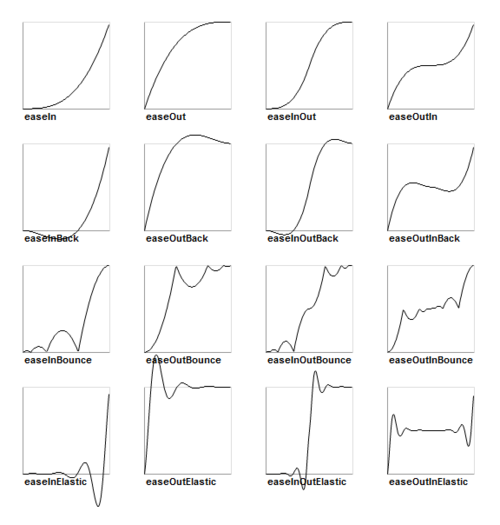
该代码创建上面是很简单的在其他框架中,这使得这个非常令人沮丧。请注意,这些曲线是将输入时间映射到输出时间(Tt曲线),而不是时间位置曲线。例如,easeOutBounce(T)= t返回一个新的t。然后,该t用于绘制运动(或我们应该设置动画的任何属性)。
因此,我想创建一个复杂的自定义,CAMediaTimingFunction但是我不知道如何执行此操作,或者是否有可能?还有其他选择吗?
编辑:
这是步骤的具体示例。很有教育意义:)
我想沿着从点a到b的直线为对象设置动画,但是我希望它使用上面的easeOutBounce曲线“反弹”其沿直线的运动。这意味着它将遵循从a到b的精确线,但是将比使用当前基于贝塞尔的CAMediaTimingFunction可能的方式更加复杂地加速和减速。
让该线成为CGPath指定的任意曲线移动。它仍应沿该曲线移动,但应与直线示例相同的方式加速和减速。
从理论上讲,我认为它应该像这样工作:
让我们将运动曲线描述为关键帧动画move(t)= p,其中t是时间[0..1],p是在时间t计算的位置。因此,move(0)返回曲线起点的位置,move(0.5)精确地到达中间,而move(1)结束。使用时间函数time(T)= t提供t的移动值应该给我我想要的。为了产生弹跳效果,计时功能应针对time(0.8)和time(0.8)返回相同的t值(只是一个例子)。只需替换计时功能即可获得不同的效果。
(是的,可以通过创建和连接来回移动的四个线段来进行跳线,但这不是必须的。毕竟,它只是一个简单的线性函数,将时间值映射到位置。)
我希望我在这里有意义。
 慕森卡
慕森卡3回答
-

慕后森
我找到了这个:可可与爱-核心动画中的参数加速曲线但是我认为可以通过使用块使其变得更简单,更易读。因此,我们可以在CAKeyframeAnimation上定义一个类别,如下所示:CAKeyframeAnimation + Parametric.h:// this should be a function that takes a time value between // 0.0 and 1.0 (where 0.0 is the beginning of the animation// and 1.0 is the end) and returns a scale factor where 0.0// would produce the starting value and 1.0 would produce the// ending valuetypedef double (^KeyframeParametricBlock)(double);@interface CAKeyframeAnimation (Parametric)+ (id)animationWithKeyPath:(NSString *)path function:(KeyframeParametricBlock)block fromValue:(double)fromValue toValue:(double)toValue;CAKeyframeAnimation + Parametric.m:@implementation CAKeyframeAnimation (Parametric)+ (id)animationWithKeyPath:(NSString *)path function:(KeyframeParametricBlock)block fromValue:(double)fromValue toValue:(double)toValue { // get a keyframe animation to set up CAKeyframeAnimation *animation = [CAKeyframeAnimation animationWithKeyPath:path]; // break the time into steps // (the more steps, the smoother the animation) NSUInteger steps = 100; NSMutableArray *values = [NSMutableArray arrayWithCapacity:steps]; double time = 0.0; double timeStep = 1.0 / (double)(steps - 1); for(NSUInteger i = 0; i < steps; i++) { double value = fromValue + (block(time) * (toValue - fromValue)); [values addObject:[NSNumber numberWithDouble:value]]; time += timeStep; } // we want linear animation between keyframes, with equal time steps animation.calculationMode = kCAAnimationLinear; // set keyframes and we're done [animation setValues:values]; return(animation);}@end现在用法将如下所示:// define a parametric functionKeyframeParametricBlock function = ^double(double time) { return(1.0 - pow((1.0 - time), 2.0));};if (layer) { [CATransaction begin]; [CATransaction setValue:[NSNumber numberWithFloat:2.5] forKey:kCATransactionAnimationDuration]; // make an animation CAAnimation *drop = [CAKeyframeAnimation animationWithKeyPath:@"position.y" function:function fromValue:30.0 toValue:450.0]; // use it [layer addAnimation:drop forKey:@"position"]; [CATransaction commit];}我知道这可能不像您想要的那么简单,但这只是一个开始。 -

繁星coding
从iOS 10开始,可以使用两个新的计时对象更轻松地创建自定义计时功能。1)UICubicTimingParameters允许将三次贝塞尔曲线定义为缓动函数。let cubicTimingParameters = UICubicTimingParameters(controlPoint1: CGPoint(x: 0.25, y: 0.1), controlPoint2: CGPoint(x: 0.25, y: 1))let animator = UIViewPropertyAnimator(duration: 0.3, timingParameters: cubicTimingParameters)或仅在动画设计器初始化时使用控制点let controlPoint1 = CGPoint(x: 0.25, y: 0.1)let controlPoint2 = CGPoint(x: 0.25, y: 1)let animator = UIViewPropertyAnimator(duration: 0.3, controlPoint1: controlPoint1, controlPoint2: controlPoint2) 这项很棒的服务将帮助您为曲线选择控制点。2)UISpringTimingParameters使开发人员可以控制阻尼比,质量,刚度和初始速度来创建所需的弹簧性能。let velocity = CGVector(dx: 1, dy: 0)let springParameters = UISpringTimingParameters(mass: 1.8, stiffness: 330, damping: 33, initialVelocity: velocity)let springAnimator = UIViewPropertyAnimator(duration: 0.0, timingParameters: springParameters)持续时间参数仍在Animator中显示,但在春季计时中将被忽略。如果这两个选项还不够,您还可以通过确认UITimingCurveProvider协议来实现自己的时序曲线。 -

白板的微信
创建自定义计时功能的一种方法是使用CAMediaTimingFunction中的functionWithControlPoints ::::工厂方法(也有相应的initWithControlPoints :::: init方法)。这是为您的计时功能创建贝塞尔曲线。它不是任意曲线,但贝塞尔曲线非常有力且灵活。掌握控制点需要一些实践。提示:大多数绘图程序都可以创建贝塞尔曲线。进行这些操作将使您对用控制点表示的曲线产生视觉反馈。在这个链接指向苹果的文档。关于如何从曲线构造预构建函数的内容很简短,但很有用。编辑:以下代码显示了一个简单的反弹动画。为此,我创建了一个合成的计时函数(值和计时 NSArray属性),并为动画的每个片段赋予了不同的时间长度(keytimes属性)。这样,您可以合成贝塞尔曲线以为动画合成更复杂的时序。这是一篇有关此类动画的好文章,并提供了不错的示例代码。- (void)viewDidLoad { UIView *v = [[UIView alloc] initWithFrame:CGRectMake(0.0, 0.0, 50.0, 50.0)]; v.backgroundColor = [UIColor redColor]; CGFloat y = self.view.bounds.size.height; v.center = CGPointMake(self.view.bounds.size.width/2.0, 50.0/2.0); [self.view addSubview:v]; //[CATransaction begin]; CAKeyframeAnimation * animation; animation = [CAKeyframeAnimation animationWithKeyPath:@"position.y"]; animation.duration = 3.0; animation.removedOnCompletion = NO; animation.fillMode = kCAFillModeForwards; NSMutableArray *values = [NSMutableArray array]; NSMutableArray *timings = [NSMutableArray array]; NSMutableArray *keytimes = [NSMutableArray array]; //Start [values addObject:[NSNumber numberWithFloat:25.0]]; [timings addObject:GetTiming(kCAMediaTimingFunctionEaseIn)]; [keytimes addObject:[NSNumber numberWithFloat:0.0]]; //Drop down [values addObject:[NSNumber numberWithFloat:y]]; [timings addObject:GetTiming(kCAMediaTimingFunctionEaseOut)]; [keytimes addObject:[NSNumber numberWithFloat:0.6]]; // bounce up [values addObject:[NSNumber numberWithFloat:0.7 * y]]; [timings addObject:GetTiming(kCAMediaTimingFunctionEaseIn)]; [keytimes addObject:[NSNumber numberWithFloat:0.8]]; // fihish down [values addObject:[NSNumber numberWithFloat:y]]; [keytimes addObject:[NSNumber numberWithFloat:1.0]]; //[timings addObject:GetTiming(kCAMediaTimingFunctionEaseIn)]; animation.values = values; animation.timingFunctions = timings; animation.keyTimes = keytimes; [v.layer addAnimation:animation forKey:nil]; //[CATransaction commit];}
 随时随地看视频慕课网APP
 iOS
iOS
 Swift
Swift