4-3 样式操作接口
本节编程练习不计算学习进度,请电脑登录imooc.com操作

样式操作接口

jQuery操作样式的接口 jQuery.fn.css 与 jQuery.css

我们知道实例是调用静态的方法,css的接口参数传递是可以很多个组合情况的,这也符合了 jQuery “少写多做”的原则了。

css: function(name, value ) {
        return value !== undefined ?
            jQuery.style(elem, name, value) :
            jQuery.css(elem, name);
 }

最终方法与设置样式的方法是实例方法,所以我们看传递的参数就知道了,只能是单一的 elem、 name、 value 实参。

jQuery.style( elem, name, value ) :
jQuery.css( elem, name );

所以如果我们传递是对象或者别的方式就需要一个过滤的环节,css 参数的处理也跟之前的 attr 属性的处理保持一致,采用了jQuery.access 方法统一调配,这个具体之前就分析了,无非就是递归参数,但是有个可学的设计思路,分离不同的逻辑判断通过回调传递进去。

jQuery.css()取值

用户传递写 css 属性名是可以很随意的,backgroundColor,backgourd-color,所以框架内部自然要过这个统一的处理。

检测是否是驼峰写法,如果不是就得转化下:

origName = jQuery.camelCase( name );

其次还有一些特殊的属性名的读取问题,比如float就是关键字,就需要转成cssFloat,还有浏览器前缀的命名处理。

name = jQuery.cssProps[origName] || (jQuery.cssProps[origName] = vendorPropName(elem.style, origName));

我们知道元素在 display:none 的情况下是无法获取一些跟布局定位有关的值的,还有不同的元素尺寸width、height、margin获取问题等等,但是这么多情况如何去处理?

jQuery在这里就引入了“css钩子”

hooks = jQuery.cssHooks[name] || jQuery.cssHooks[origName];

每一个特定方法都带有各自的处理模式,举个例子如果要获取 ele.css("width")。

那么 cssHooks.width 中就是这样一个结构:

cssHooks = {
    width:{
        get:function(){},
        set:function(){}
    }
}
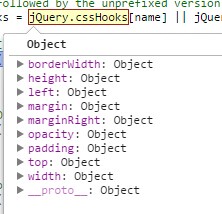
我们看到 cssHooks 几乎都是针对盒子模型的属性处理了,我们考虑下如果用户获取一个元素的 width 会有什么情况?

1. 元素在隐藏 display:none 先获取不到尺寸
2. 元素的宽度,jQuery就有width、innerWidth、outerWidth等各种不同取值方式
3. 元素可以被设置css3的盒子模型

所以针对这一种特定的属性我们需要单独拿一个钩子做处理,那么在取值的时候,我们自然在 cssHooks.width.get 中要判断一下:当元素是否是可见状态,如果不是则要先处理下,在之后判断盒子模型的处理。接下来我们看到如果没有对应的钩子方法,我们模型采用了 curCSS 取值:

if (hooks && "get" in hooks) {
    val = hooks.get(elem, true, extra);
}
if (val === undefined) {
    val = curCSS(elem, name, styles);
}

其内部就采用了 defaultView.getComputedStyle(elem, null);最终就是通过 getComputedStyle的getPropertyValue 方法了。

所以总结 jquery.css 的接口其实也很简单。

1.转化样式命名
2.处理特殊的属性比如float
3.分离出一个钩子,用于处理跟尺寸有关的属性
4.其余元素采用getComputedStyle获取对应的值


任务

  1. <!doctype html>
  2. <html>
  3. <head>
  4. <meta http-equiv="Content-type" content="text/html; charset=utf-8"/>
  5. <script src="http://code.jquery.com/jquery-latest.js"></script>
  6. <title></title>
  7. </head>
  8. <body>
  9.  
  10. <div style="background-color:yellow;">慕课网</div>
  11.  
  12. <button id="test1">jQuery.css获取background-color</button>
  13. <button id="test2">模拟css获取background-color</button>
  14.  
  15. <ul></ul>
  16.  
  17. <script type="text/javascript">
  18.  
  19. //获取最终属性
  20. //https://github.com/jquery/jquery/pull/524
  21. var getStyles = function(elem) {
  22. return elem.ownerDocument.defaultView.getComputedStyle(elem, null);
  23. };
  24.  
  25.  
  26. //返回一个css属性映射到一个浏览器商前缀的属性
  27. function vendorPropName(style, name) {
  28. // shortcut for names that are not vendor prefixed
  29. if (name in style) {
  30. return name;
  31. }
  32. // check for vendor prefixed names
  33. var capName = name[0].toUpperCase() + name.slice(1),
  34. origName = name,
  35. i = cssPrefixes.length;
  36.  
  37. while (i--) {
  38. name = cssPrefixes[i] + capName;
  39. if (name in style) {
  40. return name;
  41. }
  42. }
  43.  
  44. return origName;
  45. }
  46.  
  47. function curCSS(elem, name, computed) {
  48. var width, minWidth, maxWidth, ret,
  49. style = elem.style;
  50.  
  51. computed = computed || getStyles(elem);
  52.  
  53. if (computed) {
  54. ret = computed.getPropertyValue(name) || computed[name];
  55. }
  56.  
  57. return ret;
  58. }
  59.  
  60. function css(elem, name, extra, styles) {
  61. var val, num, hooks,
  62. //转成驼峰写法
  63. //background-color -> backgroundColor
  64. origName = jQuery.camelCase(name);
  65. // Make sure that we're working with the right name
  66. //如果是特殊属性float转成cssFloat
  67. //带有浏览器前缀处理
  68. name = jQuery.cssProps[origName] || (jQuery.cssProps[origName] = vendorPropName(elem.style, origName));
  69. hooks = jQuery.cssHooks[name] || jQuery.cssHooks[origName];
  70. if (hooks && "get" in hooks) {
  71. val = hooks.get(elem, true, extra);
  72. }
  73. //通过computed接口直接获取样式
  74. if (val === undefined) {
  75. val = curCSS(elem, name, styles);
  76. }
  77. return val;
  78. }
  79.  
  80. $("#test1").click(function() {
  81. $('ul').append('<li>jQuery.css(background-color):' + $("div").css('background-color') + '</li>')
  82. })
  83.  
  84. $("#test2").click(function() {
  85. var div = document.querySelectorAll('div')[0]
  86. $('ul').append('<li>模拟css(background-color):' + css(div,'background-color') + '</li>')
  87. })
  88.  
  89.  
  90. </script>
  91. </body>
  92. </html>
下一节