-

- 菇嘟泡泡 2022-11-09
需要为vue这种类型的文件声明一个loader

- 0赞 · 0采集
-
- 菇嘟泡泡 2022-11-09
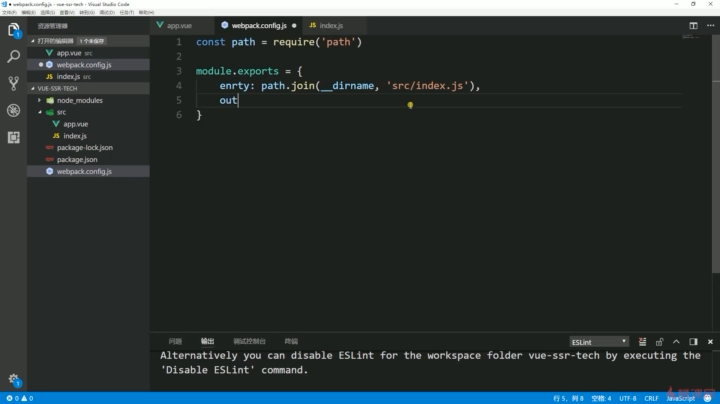
entry不要拼错了,entry用来设置入口文件路径

- 0赞 · 0采集
-
- 菇嘟泡泡 2022-11-09
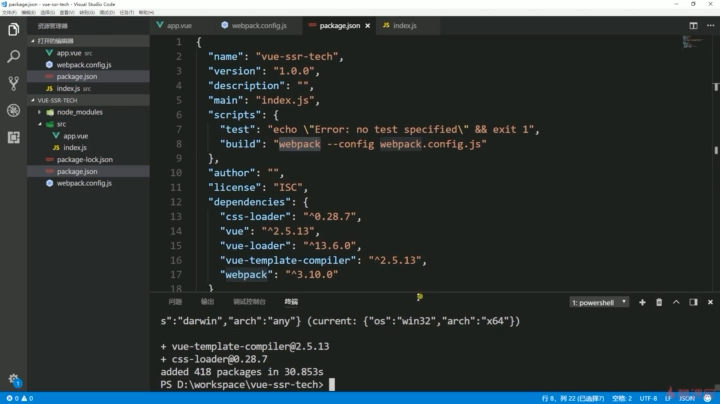
调用方法在package文件中配置建立好的webpack指令需要这样写才能调用我们自己建立后的webpack文件
- 0赞 · 0采集
-
- 菇嘟泡泡 2022-11-09
output配置输出的路径filename是文件名path是输出的文件夹

- 0赞 · 0采集
-
- 菇嘟泡泡 2022-11-09
entry是入口的配置将刚刚的入口文件打包

- 0赞 · 0采集
-
- 菇嘟泡泡 2022-11-09
构建入口文件通过mount输出到html里

- 0赞 · 0采集
-
- 菇嘟泡泡 2022-11-09
拼接绝对路径dirname是根目录路径
- 0赞 · 0采集
-

- 陈加州 2022-04-14

插件
- 0赞 · 0采集
-

- 慕沐6592840 2022-04-03
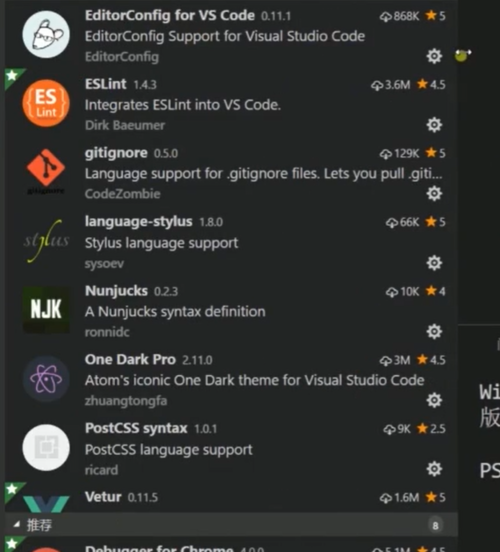
vscode插件安装:

- 0赞 · 0采集
-

- qq_虎啸祥瑞_04391808 2022-03-10
 package.json里面项目的配置
- 0赞 · 0采集
-

- 若如繁星 2022-02-09
npm init
npm i webpack vue vue-loader
npm i css-loader vue-template-compiler
- 0赞 · 0采集
-

- kinpp 2021-10-31
插件

- 0赞 · 0采集
-
- Schuck哦 2021-09-02
vue工程的搭建
npm init
1、npm i webpack vue vue-loader
2、npm i css-loader vue-template-compiler
3、新建src目录并在src下新建app.vue
4、在app.vue中编写vue组件
5、在根目录下新建webpack.config.js
- 0赞 · 0采集
-

- qq_迷宫的十字路口_2 2021-07-20
Module build failed (from ./src/index.js):
C:\aboutHtml\pro_demo\src\index.js:1
(function (exports, require, module, __filename, __dirname) { import Vue from 'vue'
^^^^^^
SyntaxError: Cannot use import statement outside a module
错误解决:
添加module :
module:{
rules:[
{
test: /.js$/,
loader: 'babel-loader',
exclude: /node_modules/
},
{
test: /.vue$/,
loader: 'vue-loader'
}
]
},
导入模块:
npm install babel
npm install babel-core
npm install babel-loader@7.1.5
- 0赞 · 0采集
-
- weixin_慕用6334942 2021-05-21
初始化项目npm init
安装需要的包npm install webpack Vue Vue-loader
安装需要的依赖 npm i css-loader vue-template-compiler
新建文件夹src 放置编码
.vue文件是vue的特殊开发方式;是一个组件不能直接挂载到html中

需要新建index.js文件
新建文件webpackconfig.js 打包前端资源
运行npm run build
- 0赞 · 0采集
-

- 叶篱落001 2020-10-21
报错信息
Module Error (from ./node_modules/vue-loader/lib/index.js):
vue-loader was used without the corresponding plugin. Make sure to include VueLoaderPlugin in your webpack config.
原因参考
https://vue-loader.vuejs.org/migrating.html#a-plugin-is-now-required
解决办法
// webpack.config.js
const VueLoaderPlugin = require('vue-loader/lib/plugin')
module.exports = {
// ...
plugins: [
new VueLoaderPlugin()
]
}
- 1赞 · 0采集
-
- qq_加油君_1 2020-06-12
使用vue-loader15
根据vue-loader官方提供的15版本的声明方法,定义plugin。const VueLoaderPlugin = require('vue-loader/lib/plugin') module.exports = { module: { rules: [ // ... other rules { test: /\.vue$/, loader: 'vue-loader' } ] }, plugins: [ new VueLoaderPlugin() //15版本需指定plugin ]}- 0赞 · 0采集
-

- lihanlili 2020-05-12
- Ddfff
- 0赞 · 0采集
-

- lpzh_ 2020-04-26
- 2-1(8)再次执行打包命令: npm run build 可以看到,这次打包成功,输出目标文件 dist/bundle.js文件,这个通过<script>标签引入到htr文件中,然后在浏览器执行。 (注:视频中没有演示在浏览器中执行bundle.js)
-
截图0赞 · 0采集
-
- lpzh_ 2020-04-26
- 2-1(7)根据错误提示,在webpack.config.js文件中添加处理单文件组件的规则的配置,如下图所示,这段配置规则的作用是: 使用 vue-loader来处理以 .vue结尾的文件,它是一个正则表达式匹配规则。
-
截图0赞 · 0采集
-
- lpzh_ 2020-04-26
- 2-1(6) 使用webpack执行打包: 1)首先在npm项目的配置文件(package.json)文件中添加webpack运行打包的相关配置,添加下面这一行配置: "build":"webpack --config webpack.config.js" 这行配置的作用是: 在执行webpack打包命令时,使用的是本项目安装的webpack版本,而如果没有这行配置,直接执行打包命令,使用的是全局安装的webpack版本。 2)执行webpack打包命令: npm run build
-
截图0赞 · 0采集
-
- lpzh_ 2020-04-26
- 2-1(5) webpack的配置详情,如图:
-
截图0赞 · 0采集
-
- lpzh_ 2020-04-26
- 2-1(5) 很显然,上一步创建的app.vue组件无法直接在浏览器中运行的,需要webpack工具进行打包编译,所以: 1)新建webpack打包入口文件: index.js 2)新建webpack配置文件:webpack.config.js 3)配置webpack打包的输入文件为index.js ,输出目标为: dist/bundle.js,webpack在打包时会自动创建bundle.js文件,bundle.js文件可以直接在浏览器中运行。
-
截图0赞 · 0采集
-
- lpzh_ 2020-04-26
- 2-1(4) 新建src目录作为项目源码放置目录,在src目录下创建一个vue组件: app.vue
-
截图0赞 · 0采集
-
- lpzh_ 2020-04-26
- 2-1(3) 根据上一步的警告提示,安装相应的css-loader和vue-template-compiler 从截图中可以看到老师安装的vue的版本为vue@2.5.13
-
截图0赞 · 0采集
-
- lpzh_ 2020-04-25
- 2-1(2)安装Vue 、Vue-loader
-
截图0赞 · 0采集
-
- lpzh_ 2020-04-25
- 2-1(1) 初始化项目: npm init 说明: 初始化一个npm项目,回车之后,出现的选项一路默认即可。
-
截图0赞 · 0采集
-

- 上善若水厚德载物江 2020-03-23
- 这个是封装需要的vue和webpack内容
-
截图0赞 · 0采集
-

- 慕粉1018193668 2020-02-20
npm i css-loader vue-template-compiler
-
截图0赞 · 0采集
-
- 慕粉1018193668 2020-02-20
npm i webpack vue vue-loader
-
截图0赞 · 0采集
