-

- 慕粉1927057669 2022-04-20
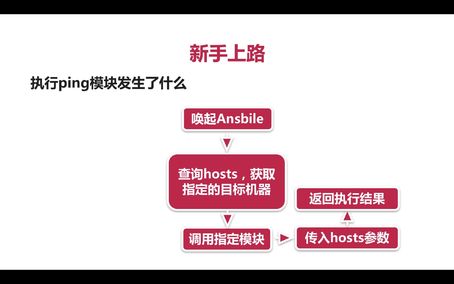
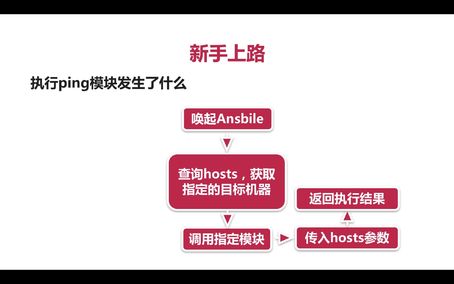
ansible执行流程
- 0赞 · 0采集
-
- 慕粉1927057669 2022-04-20
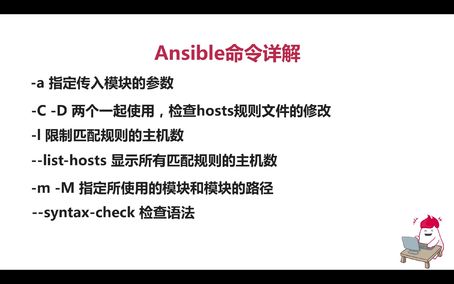
Ansible命令详解
 7
7- 0赞 · 0采集
-

- 慕运维7144650 2022-01-25
 ansible

- 0赞 · 0采集
-

- 慕前端8459280 2019-11-15
执行ping模块流程
-
截图0赞 · 0采集
-
- 慕前端8459280 2019-11-15
Ansible命令格式-------- ansible all -m ping
-
截图0赞 · 0采集
-
- 慕前端8459280 2019-11-15
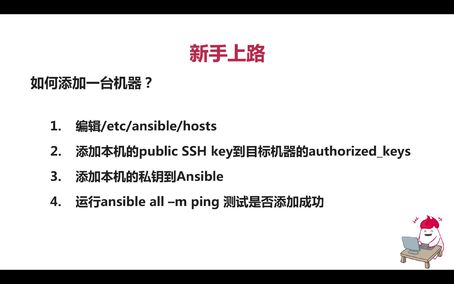
ansible添加机器
-
截图0赞 · 0采集
-

- gongwanyi 2019-09-22
Ansible命令详解
1、-a指定传入模块的参数
2、-C -D两个一起使用,检查hosts规则文件的修改
3、-I 限制匹配规则的主机数
4、--list-hosts显示所有匹配规则的主机数
5、-m -M指定所使用的模块和模块的路径
6、--syntax-check检查语法
7、-v显示详细的日志
-
截图0赞 · 0采集
-
- gongwanyi 2019-09-22
执行Ansible的流程
-
截图0赞 · 0采集
-
- gongwanyi 2019-09-22
#ansible all -a 'ls'
-
截图0赞 · 0采集
-
- gongwanyi 2019-09-22
Ansible命令格式——ansible all -m ping
1、ansible命令主体——ansible/ansible-playbook
2、被操作的目标机器的正则表达式——all
3、指定要使用的模块—— -m ping
4、传入的参数
-
截图0赞 · 0采集
-
- gongwanyi 2019-09-22
1、配置公钥,双机互信以后
2、配置/etc/ansible/hosts
-添加目标机器的IP地址进去
3、#ansible all -m piing
-
截图0赞 · 0采集
-
- gongwanyi 2019-09-22
添加一台机器
1、编辑/etc/ansible/hosts
2、添加本机的public SSH key到目标机器的authorized_keys
3、添加本机的私钥到Ansible
4、运行ansible all -m ping测试是否添加成功
-
截图0赞 · 0采集
-
- gongwanyi 2019-09-22
添加一台机器
1、编辑/etc/ansible/hosts
2、添加本机的public SSH key到目标机器的authorized_keys
3、添加本机的私钥到Ansible
-
截图0赞 · 0采集
-
- gongwanyi 2019-09-22
课程目标
1、新手上路
2、学习Ansible的基本模块
3、学习使用Ansible Inventory
4、了解Ansible Playbook
-
截图0赞 · 0采集
-

- justsososo 2019-03-23
centos7.6 64位
ansible 2.7.8
python 2.7.5
控制端ip:10.16.168.103
被控端ip: 10.16.168.104
1、添加控制主机、
[root@centos7 ~]# cat /etc/ansible/hosts
10.16.168.103
10.16.168.104
2、ansible控制端端生成秘钥对、
[root@centos7 ~]# ssh-keygen
3、将公钥复制到被控端、
[root@centos7 ~]# ssh-copy-id 10.16.168.103
[root@centos7 ~]# ssh-copy-id 10.16.168.104
4、执行ansible的ping模块、
[root@centos7 ~]# ansible all -m ping
10.16.168.103 | SUCCESS => {
"changed": false,
"ping": "pong"
}
10.16.168.104 | SUCCESS => {
"changed": false,
"ping": "pong"
}
- 3赞 · 2采集
-

- 慕无忌4111159 2019-03-06
ansible命令
-
截图0赞 · 0采集
-
- 慕无忌4111159 2019-03-06
ansible命令格式
-
截图0赞 · 0采集
-
- 慕无忌4111159 2019-03-06
ansible添加机器
-
截图0赞 · 0采集
-

- 潇啊 2018-09-27
1.文件如果不存在,则新建
-
截图0赞 · 0采集
-

- 慕姐3830262 2018-06-18
import sys
sys.exit(1)
- 0赞 · 0采集
-

- qq_平凡的土豆_0 2018-05-22
1、添加主机到/etc/ansible/hosts
2、添加本机的公钥到目标机器
3、添加本机的私钥到ansible
4、运行ansible all -m ping测试是否添加成功
- 0赞 · 1采集
-

- 慕粉4216852 2017-12-05
- error:ERROR! Unexpected Exception, this is probably a bug: (cryptography 1.3.1 (/usr/lib64/python2.7/site-packages), Requirement.parse('cryptography>=1.5')) 的情况下使用 pip install --upgrade cryptography
- 0赞 · 0采集
-

- 菲嫣 2017-10-19
- 第二步的操作方式为:主机A,目标远程主机B; 配置前,先在主机A上上使用ssh-keygen生成公私钥对,然后使用命令:ssh-copy-id IP(目标远程主机B),将主机A的公钥传到目标远程主机B上。此时目标远程主机B的/etc/ansible路径下就会有authorized_keys文件。
- 3赞 · 0采集
-

- 小明同学爱思考 2017-09-28
- Ansible命令详解
-
截图0赞 · 1采集
-
- 小明同学爱思考 2017-09-28
- 执行ping模块发生了什么
-
截图0赞 · 0采集
-
- 小明同学爱思考 2017-09-28
- Ansible命令格式
-
截图0赞 · 1采集
-
- 小明同学爱思考 2017-09-28
- 如何添加一台机器
-
截图0赞 · 0采集
-

- zwy_eagle 2017-08-19
- 学习
-
截图0赞 · 0采集
-

- 慕后端4352131 2017-07-11
- ansible 命令参数
-
截图0赞 · 0采集
