-

- 慕的地7051401 2021-11-06
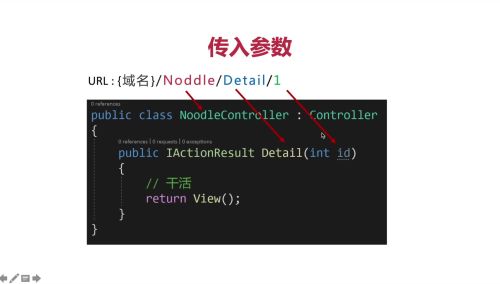
路由设置:


- 0赞 · 0采集
-

- 一澄几许9527 2021-04-02
自定义默认路由
-
截图0赞 · 0采集
-

- 慕移动6449871 2020-12-19
自定义默认路由

- 0赞 · 1采集
-

- 慕丝3317923 2020-11-12
中间件 app.UseMvcWithDefaultRoute()
-
截图0赞 · 0采集
-
- 慕丝3317923 2020-11-12
1.wwwroot 网站的根目录 自动被服务器与域名进行映射
-
截图0赞 · 0采集
-
- 慕丝3317923 2020-11-12
映射必须保存在服务器中
url路径一致
-
截图0赞 · 0采集
-
- 慕丝3317923 2020-11-12
服务器请求文件, 映射, 返回 http 文件
-
截图0赞 · 0采集
-

- 慕沐0356862 2020-08-15
- 1.深入理解ASP.NET MVC 2.理解mvc的路由系统 3.建立数据模型 4.学会依赖注入 5.深入理解页面语言Razor 6.使用Entity Framework Core持久化数据 7.使用ASP.NET MVC来创建网站应用。
-
截图0赞 · 0采集
-

- 故沉 2020-04-24
MVC路由系统
-
截图0赞 · 0采集
-

- qq_一笑春风_0 2020-04-17
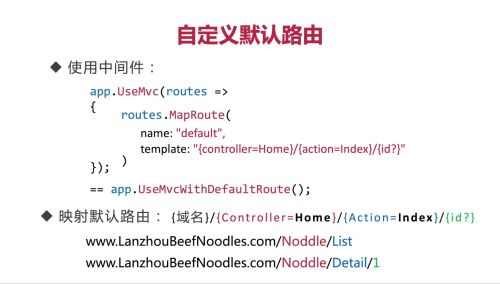
自定义默认路由
使用中间件:
app.UseMvc(routes=>{
routes.MapRoute(name:"default",template:"{controller=Home}/{action=Index}/{id?}")
});
- 0赞 · 0采集
-
- qq_一笑春风_0 2020-04-17
ASP.NET MVC系统默认路由
使用中间件:
app.UserMvcWithDefaultRoute();
映射默认路由:
{域名}/{Contorller=Home}/{Action=Index}/{value?}
- 0赞 · 0采集
-

- qq_念想_7 2020-04-16
默认路由
中间件:app.UseMvcWithDefaultRoute();
映射默认路由:{域名}/{Controller=Home}/{Action=Index}/{value?}
-
截图0赞 · 0采集
-

- leosWeb 2020-03-20
app.UseMvc(routes =>
{
routes.MapRoute(
name: "defalut",
template:"{controller=Home}/{action=Index}/{id?}"
==app.UseMvcWithDefaultRoute();
}
使用中间件或者映射默认路由都可以
- 0赞 · 0采集
-

- 进击的少司命 2019-12-10
传统的路由:
映射资源必须保存在服务器中
url的相对路径必须于请求路径一致
无法服务动态文件
文件必须带有后缀
暴露服务器的文件结构
ASP.Net MVC路由系统
无需文件真正保存在硬盘上
访问文件无需后缀
url结构于服务器文件夹结构无关
- 0赞 · 2采集
-

- fin1der 2019-10-31
app.UseMvc(routes=>
{
routes.MapRoutes(
name:"default",
template:"{controller=Home}/{action=Index}/{id?}"
);
==app.UseMvcWithDefaultRoute();
}
- 0赞 · 0采集
