关于Motan的设计可以参考这篇手记:https://www.imooc.com/article/18750
这里对源码进行简单的学习记录:
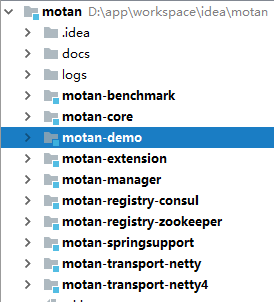
1-从github上面下载下来后源码目录:
2-入口
我们从Motan本身提供的demo进行开始简单的学习
首先启动服务类:
com.weibo.motan.demo.server.MotanApiExportDemo
public static void main(String[] args) throws InterruptedException {
    ServiceConfig<MotanDemoService> motanDemoService = new ServiceConfig<MotanDemoService>();

    // 设置接口及实现类
    motanDemoService.setInterface(MotanDemoService.class);
    motanDemoService.setRef(new MotanDemoServiceImpl());

    // 配置服务的group以及版本号
    motanDemoService.setGroup("motan-demo-rpc");
    motanDemoService.setVersion("1.0");
    // 配置注册中心直连调用
    RegistryConfig registry = new RegistryConfig();
    registry.setRegProtocol("local");
    motanDemoService.setRegistry(registry);
    // 配置RPC协议
    ProtocolConfig protocol = new ProtocolConfig();
    protocol.setId("motan");
    protocol.setName("motan");
    motanDemoService.setProtocol(protocol);
    motanDemoService.setExport("motan:8004");
    motanDemoService.export();
    MotanSwitcherUtil.setSwitcherValue(MotanConstants.REGISTRY_HEARTBEAT_SWITCHER, true);
    System.out.println("server start...");
}
这段代码主要完成的是服务的注册和暴露,提供给客户端进行RPC的调用
可以修改motanDemoService.setExport("motan:8004");端口号,启动多个服务注册
然后我们启动客户端
com.weibo.motan.demo.client.
public static void main(String[] args) {
    RefererConfig<MotanDemoService> motanDemoServiceReferer = new RefererConfig<MotanDemoService>();
    // 设置接口及实现类
    motanDemoServiceReferer.setInterface(MotanDemoService.class);
    // 配置服务的group以及版本号
    motanDemoServiceReferer.setGroup("motan-demo-rpc");
    motanDemoServiceReferer.setVersion("1.0");
    motanDemoServiceReferer.setRequestTimeout(1000);
    // 配置注册中心直连调用
    List<RegistryConfig>registryConfigList=new ArrayList<>();
    RegistryConfig registry = new RegistryConfig();
    //use direct registry
    registry.setRegProtocol("direct");
    registry.setAddress("127.0.0.1:8002");
    RegistryConfig registry1 = new RegistryConfig();
    //use direct registry
    registry1.setRegProtocol("direct");
    registry1.setAddress("127.0.0.1:8003");
    registryConfigList.add(registry);
    registryConfigList.add(registry1);
    motanDemoServiceReferer.setRegistries(registryConfigList);
    // 配置RPC协议
    ProtocolConfig protocol = new ProtocolConfig();
    protocol.setId("motan");
    protocol.setName("motan");
    motanDemoServiceReferer.setProtocol(protocol);
    // motanDemoServiceReferer.setDirectUrl("localhost:8002");  // 注册中心直连调用需添加此配置
    // 使用服务
    MotanDemoService service = motanDemoServiceReferer.getRef();
    System.out.println(service.hello("motan"));
    System.out.println(service.hello("motan121212"));
    System.exit(0);
}
这段代码首先是配置参数包括要调用的接口,和对应的服务地址
MotanDemoService service = motanDemoServiceReferer.getRef();这里是重要的方法会返回一个
代理对象。(如果是和spring结合使用,这里应该是注入的方式,spring会帮我们生成代理对象.)
生成代理对象的同时会做一些初始化的处理,比如netty channel池的构建,会先初始化两个已经获取
到连接的channel。这样真正后续的请求,会直接从channel缓存池中获取。通过实现自己的SharedObjectFactory
来实现的对象池。
点进去可以看到:
ref = configHandler.refer(interfaceClass, clusters, proxy);
继续跟进去
@Override
public <T> T refer(Class<T> interfaceClass, List<Cluster<T>> clusters, String proxyType) {
    ProxyFactory proxyFactory = ExtensionLoader.getExtensionLoader(ProxyFactory.class).getExtension(proxyType);
    return proxyFactory.getProxy(interfaceClass, clusters);
}
最后会返回jdk的动态代理类
public class JdkProxyFactory implements ProxyFactory {

    @Override
    @SuppressWarnings("unchecked")
    public <T> T getProxy(Class<T> clz, List<Cluster<T>> clusters) {
        return (T) Proxy.newProxyInstance(clz.getClassLoader(), new Class[]{clz}, new RefererInvocationHandler<>(clz, clusters));
    }
}
获取到代理类后会进行调用具体的方法
service.hello("motan")
此时会执行com.weibo.api.motan.proxy.RefererInvocationHandler类的invoke方法

会调用response = cluster.call(request);
然后会代理给com.weibo.api.motan.cluster.support.ClusterSpi
继续调用return haStrategy.call(request, loadBalance);
此时会根据Ha策略的配置进行走不同的逻辑:
FailfastHaStrategy:失败会马上报异常
Referer<T> refer = loadBalance.select(request);//根据配置的策略选择一个服务地址
return refer.call(request);//进行具体的调用

还有一种Ha策略:
FailoverHaStrategy具体含义可以参考文章开头推荐的文章,很详细
后续会继续进一步的分析。
 随时随地看视频