
看了好几天的netty实战,慢慢摸索,虽然还没有摸着很多门道,但今天还是把之前想加入到项目里的
一些想法实现了,算是有点信心了吧(讲真netty对初学者还真的不是很友好......)
首先,当然是在SpringBoot项目里添加netty的依赖了,注意不要用netty5的依赖,因为已经废弃了
<!--netty--><dependency> <groupId>io.netty</groupId> <artifactId>netty-all</artifactId> <version>4.1.32.Final</version></dependency>
将端口和IP写入application.yml文件里,我这里是我云服务器的内网IP,如果是本机测试,用127.0.0.1就ok
netty: port: 7000 url: 172.16.0.7 |
在这之后,开始写netty的服务器,这里服务端的逻辑就是将客户端发来的信息返回回去
因为采用依赖注入的方法实例化netty,所以加上@Component注释


1 package com.safelocate.app.nettyServer; 2 3 import io.netty.bootstrap.ServerBootstrap; 4 import io.netty.channel.*; 5 import io.netty.channel.nio.NioEventLoopGroup; 6 import io.netty.channel.socket.nio.NioServerSocketChannel; 7 import org.apache.log4j.Logger; 8 import org.springframework.stereotype.Component; 9 10 import java.net.InetSocketAddress;11 12 @Component13 public class NettyServer {14 //logger15 private static final Logger logger = Logger.getLogger(NettyServer.class);16 public void start(InetSocketAddress address){17 EventLoopGroup bossGroup = new NioEventLoopGroup(1);18 EventLoopGroup workerGroup = new NioEventLoopGroup();19 try {20 ServerBootstrap bootstrap = new ServerBootstrap()21 .group(bossGroup,workerGroup)22 .channel(NioServerSocketChannel.class)23 .localAddress(address)24 .childHandler(new ServerChannelInitializer())25 .option(ChannelOption.SO_BACKLOG, 128)26 .childOption(ChannelOption.SO_KEEPALIVE, true);27 // 绑定端口,开始接收进来的连接28 ChannelFuture future = bootstrap.bind(address).sync();29 logger.info("Server start listen at " + address.getPort());30 future.channel().closeFuture().sync();31 } catch (Exception e) {32 e.printStackTrace();33 bossGroup.shutdownGracefully();34 workerGroup.shutdownGracefully();35 }36 }37 38 }
Server.java
当然,这里的ServerChannelInitializer是我自己定义的类,这个类是继承ChannelInitializer<SocketChannel>的,里面设置出站和入站的编码器和解码器
package com.safelocate.app.nettyServer;import io.netty.channel.ChannelInitializer;import io.netty.channel.socket.SocketChannel;import io.netty.handler.codec.string.StringDecoder;import io.netty.handler.codec.string.StringEncoder;import io.netty.util.CharsetUtil;public class ServerChannelInitializer extends ChannelInitializer<SocketChannel> {
    @Override    protected void initChannel(SocketChannel channel) throws Exception {
        channel.pipeline().addLast("decoder",new StringDecoder(CharsetUtil.UTF_8));
        channel.pipeline().addLast("encoder",new StringEncoder(CharsetUtil.UTF_8));
        channel.pipeline().addLast(new ServerHandler());
    }
}
ServerChannelinitializer.java
最好注意被别decoder和encoder写成了一样的,不然会出问题(我之前就是不小心都写成了StringDecoder...)
在这之后就是设置ServerHandler来处理一些简单的逻辑了
package com.safelocate.app.nettyServer;import io.netty.channel.ChannelHandlerContext;import io.netty.channel.ChannelInboundHandlerAdapter;import io.netty.channel.SimpleChannelInboundHandler;import java.io.IOException;import java.io.OutputStream;import java.io.PrintWriter;import java.net.InetAddress;import java.net.Socket;public class ServerHandler extends ChannelInboundHandlerAdapter {
    @Override    public void channelActive(ChannelHandlerContext ctx) {
        System.out.println("channelActive----->");
    }


    @Override    public void channelRead(ChannelHandlerContext ctx, Object msg) throws Exception {
        System.out.println("server channelRead......");
        System.out.println(ctx.channel().remoteAddress()+"----->Server :"+ msg.toString());        //将客户端的信息直接返回写入ctx
        ctx.write("server say :"+msg);        //刷新缓存区        ctx.flush();
    }

    @Override    public void exceptionCaught(ChannelHandlerContext ctx, Throwable cause) throws Exception {
        cause.printStackTrace();
        ctx.close();
    }
}
ServerHandler.java
准备工作到这里,现在要做到就是去启动这个程序
将AppApplication实现CommandLineRunner这个接口,这个接口可以用来再启动SpringBoot时同时启动其他功能,比如配置,数据库连接等等
然后重写run方法,在run方法里启动netty服务器,Server类用@AutoWired直接实例化
package com.safelocate.app;import com.safelocate.app.nettyServer.NettyServer;import io.netty.channel.ChannelFuture;import org.springframework.beans.factory.annotation.Autowired;import org.springframework.beans.factory.annotation.Value;import org.springframework.boot.CommandLineRunner;import org.springframework.boot.SpringApplication;import org.springframework.boot.autoconfigure.SpringBootApplication;import java.net.InetAddress;import java.net.InetSocketAddress;
@SpringBootApplicationpublic class AppApplication implements CommandLineRunner {

    @Value("${netty.port}")    private int port;

    @Value("${netty.url}")    private String url;

    @Autowired    private NettyServer server;    public static void main(String[] args) {
        SpringApplication.run(AppApplication.class, args);
    }
    @Override    public void run(String... args) throws Exception {
        InetSocketAddress address = new InetSocketAddress(url,port);
        System.out.println("run  .... . ... "+url);
        server.start(address);
    }
}
AppApplication.java
ok,到这里服务端已经写完,本地我也已经测试完,现在需要打包部署服务器,当然这个程序只为练手...
控制台输入mvn clean package -D skipTests 然后将jar包上传服务器,在这之后,需要在腾讯云/阿里云那边配置好安全组,将之前yml文件里设定的端口的入站
规则设置好,不然访问会被拒绝
之后java -jar命令运行,如果需保持后台一直运行 就用nohup命令,可以看到程序已经跑起来了,等待客户端连接交互

之后就是写客户端了,客户端其实是依葫芦画瓢,跟上面类似
Handler
package client;import io.netty.channel.ChannelHandlerContext;import io.netty.channel.ChannelInboundHandlerAdapter;public class ClientHandler extends ChannelInboundHandlerAdapter {
    @Override    public void channelActive(ChannelHandlerContext ctx) {
        System.out.println("ClientHandler Active");
    }

    @Override    public void channelRead(ChannelHandlerContext ctx, Object msg) {
        System.out.println("--------");
        System.out.println("ClientHandler read Message:"+msg);
    }


    @Override    public void exceptionCaught(ChannelHandlerContext ctx, Throwable cause) {
        cause.printStackTrace();
        ctx.close();
    }

}
ClientHandler.java
ChannelInitializer
package client;import io.netty.channel.ChannelInitializer;import io.netty.channel.ChannelPipeline;import io.netty.channel.socket.SocketChannel;import io.netty.handler.codec.string.StringDecoder;import io.netty.handler.codec.string.StringEncoder;import io.netty.util.CharsetUtil;public class ClientChannelInitializer extends ChannelInitializer<SocketChannel> {    protected void initChannel(SocketChannel channel) throws Exception {
        ChannelPipeline p = channel.pipeline();
        p.addLast("decoder", new StringDecoder(CharsetUtil.UTF_8));
        p.addLast("encoder", new StringEncoder(CharsetUtil.UTF_8));
        p.addLast(new ClientHandler());
    }
}
ClientChannelInitializer
主函数所在类,即客户端
package client;import io.netty.bootstrap.Bootstrap;import io.netty.channel.*;import io.netty.channel.nio.NioEventLoopGroup;import io.netty.channel.socket.SocketChannel;import io.netty.channel.socket.nio.NioSocketChannel;import io.netty.handler.codec.string.StringDecoder;import io.netty.handler.codec.string.StringEncoder;public class Client {    static final String HOST = System.getProperty("host", "服务器的IP地址");    static final int PORT = Integer.parseInt(System.getProperty("port", "7000"));    static final int SIZE = Integer.parseInt(System.getProperty("size", "256"));    public static void main(String[] args) throws Exception {
        sendMessage("hhhh");
    }    public static void sendMessage(String content) throws InterruptedException{        // Configure the client.
        EventLoopGroup group = new NioEventLoopGroup();        try {
            Bootstrap b = new Bootstrap();
            b.group(group)
                    .channel(NioSocketChannel.class)
                    .option(ChannelOption.TCP_NODELAY, true)
                    .handler(new ChannelInitializer<SocketChannel>() {
                        @Override                        public void initChannel(SocketChannel ch) throws Exception {
                            ChannelPipeline p = ch.pipeline();
                            p.addLast("decoder", new StringDecoder());
                            p.addLast("encoder", new StringEncoder());
                            p.addLast(new ClientHandler());
                        }
                    });

            ChannelFuture future = b.connect(HOST, PORT).sync();
            future.channel().writeAndFlush(content);
            future.channel().closeFuture().sync();
        } finally {
            group.shutdownGracefully();
        }
    }

}
Client.java
启动客户端,这里就是简单发送一条"hhhh",可以看到客户端已经收到服务器发来的信息

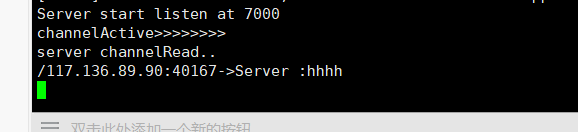
然后再看服务端,也有相应的信息打印
推荐一个挺好的学netty的博客,https://blog.csdn.net/linuu/article/details/51306480,搭配netty实战这本书一起学习效果很好
 随时随地看视频