
闲时写的了一个俄罗斯方块小游戏,拿出来和大家分享一下编码过程
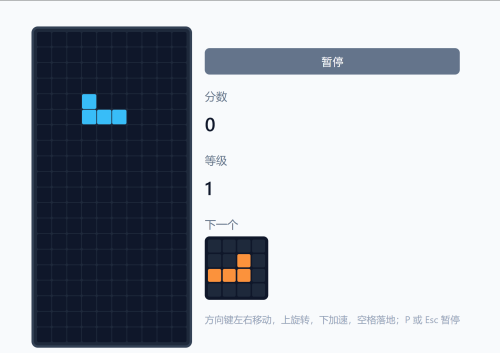
游戏的盘面列数固定为10,行数固定为20,如果有需要也可以修改为其他。方块的形状一共有7种,每个形状用二维数组表示,非 0 表示该格属于方块,数值即颜色编号 1~7, 例如 T:`[[0,3,0],[3,3,3]]` 表示 3×3 中 T 形。
当前方块的结构为`{ shape, x, y, _rotated? }`,其含义为`shape`:在 SHAPES 中的下标(0~6),`x`, `y`:方块左上角在棋盘上的格子坐标,`_rotated`:可选,当前旋转后的形状矩阵(含颜色),用于连续多次旋转,显示与碰撞时:若有 `_rotated` 则用 `_rotated`,否则用 `SHAPES[shape]` 转成带颜色的矩阵。
其中还有以下几个游戏状态:
- `started`:是否已点过「开始游戏」
- `gameOver`:是否游戏结束
- `paused`:是否暂停
- `score` / `level`:分数与等级
- `nextShapeIndex`:下一个方块的形状下标
- `timerId`:`setInterval` 的句柄,用于自动下落
<template>
  <div class="tetris-page">
    <div class="page-container tetris-wrap">
      <h1 class="page-title">俄罗斯方块</h1>
      <div class="tetris-layout">
        <div class="tetris-board-wrap">
          <!-- 游戏画布:10×20 网格,每个格子由 board 与当前方块叠加得到 -->
          <div
            class="tetris-board"
            :class="{ 'is-over': gameOver }"
            ref="boardRef"
            tabindex="0"
            @keydown="onKeyDown"
          >
            <div
              v-for="(row, i) in displayGrid"
              :key="i"
              class="tetris-row"
            >
              <div
                v-for="(cell, j) in row"
                :key="j"
                class="tetris-cell"
                :class="cell ? `color-${cell}` : ''"
              />
            </div>
            <div v-if="gameOver" class="tetris-overlay">
              <p>游戏结束</p>
              <button type="button" class="btn-restart" @click="start">再来一局</button>
            </div>
            <div v-else-if="paused" class="tetris-overlay tetris-overlay--pause">
              <p>已暂停</p>
              <button type="button" class="btn-restart" @click="togglePause">继续游戏</button>
            </div>
            <div v-else-if="!started" class="tetris-overlay">
              <p>按开始游戏</p>
              <button type="button" class="btn-restart" @click="start">开始游戏</button>
            </div>
          </div>
        </div>
        <aside class="tetris-side">
          <div class="side-block" v-if="started && !gameOver">
            <button type="button" class="btn-pause" @click="togglePause">
              {{ paused ? '继续' : '暂停' }}
            </button>
          </div>
          <div class="side-block">
            <div class="side-label">分数</div>
            <div class="side-value">{{ score }}</div>
          </div>
          <div class="side-block">
            <div class="side-label">等级</div>
            <div class="side-value">{{ level }}</div>
          </div>
          <div class="side-block">
            <div class="side-label">下一个</div>
            <div class="next-preview">
              <div
                v-for="(row, i) in nextPreview"
                :key="i"
                class="next-row"
              >
                <div
                  v-for="(c, j) in row"
                  :key="j"
                  class="next-cell"
                  :class="c ? `color-${c}` : ''"
                />
              </div>
            </div>
          </div>
          <p class="side-hint">
            方向键左右移动,上旋转,下加速,空格落地;P 或 Esc 暂停
          </p>
        </aside>
      </div>
    </div>
  </div>
</template>
开发逻辑流程
一,游戏循环
1. “开始“:`start()` 清空棋盘、重置分数与等级、生成第一个方块、启动 `startTick()`。
2. “定时下落“:`setInterval(tick, speed)`,每次 `tick` 调用 `moveDown()`;`speed` 随等级变快(如 500 - (level-1)*50,最小 100ms)。
3. “暂停“:`paused === true` 时 `tick` 直接 return,并清除定时器;继续时重新 `startTick()`。
4. “结束“:新方块 `spawnPiece()` 后若立即碰撞,置 `gameOver` 并 `stopTick()`。
方块生成(spawnPiece)
- 使用当前 `nextShapeIndex` 作为新方块形状,再随机出下一个 `nextShapeIndex`。
- 出生位置:水平居中,`y = 0`(顶部)。
- 若出生即与底板或边界碰撞,则判定游戏结束。
二,移动与碰撞
- “左右移动“:`x ± 1`,用 `collidesWith(piece)` 检测,不碰撞才更新 `current`。
- “下落“:`y + 1`,若碰撞则不再下移,改为执行 `lockPiece()` 并生成新块。
- “硬着陆(空格)“:从当前 `y` 循环向下直到碰撞,然后 `lockPiece()`。
“碰撞统一约定“:
- 使用「当前方块矩阵 + (x,y)」与 `board`、边界做检测。
- 若方块带 `_rotated`,必须用 `piece._rotated` 参与碰撞,否则会与显示不一致(尤其是旋转后的左右移动、下落)。
三,旋转
- “连续旋转“:每次按「上」都在“当前显示矩阵“基础上再顺时针旋转 90°,而不是始终从 SHAPES 原始形状旋转。
- 实现:`currentMat = getCurrentShapeMatrix()` → `rotated = rotateMatrix90(currentMat)` → 用 `rotated` 做碰撞并写回 `current._rotated`。
- “墙踢(Wall Kick)“:若旋转后在原位碰撞,则依次尝试 `x-1`、`x+1` 再检测,通过则顺带修改 `current.x`。
四,锁定与消行(lockPiece → clearLines)
- “锁定“:把当前方块矩阵按 `(x,y)` 写入 `board`,然后 `clearLines()`,再 `spawnPiece()`。
- “消行“:从底向上遍历每一行,若整行非 0 则删除该行并在顶部补一行 0,并累计消除行数。
- “计分“:1/2/3/4 行分别 100/300/500/800 分,再乘以当前 `level`;等级按 `floor(score/1000) + 1` 计算。
五,显示
- “棋盘显示“:`displayGrid = board` 的深拷贝,再叠加上当前方块的矩阵(用 `getCurrentShapeMatrix()` 与 `current.x/y` 写入对应格子)。
- “下一个预览“:用 `nextShapeIndex` 对应的形状矩阵,居中画在 4×4 的预览格子里。
import { ref, computed, watch, onMounted, onUnmounted } from 'vue'

// 7 种方块的形状(相对坐标,4×4 内),值为颜色编号 1-7
const SHAPES = [
  [[1, 1, 1, 1]], // I
  [[2, 2], [2, 2]], // O
  [[0, 3, 0], [3, 3, 3]], // T
  [[0, 4, 4], [4, 4, 0]], // S
  [[5, 5, 0], [0, 5, 5]], // Z
  [[6, 0, 0], [6, 6, 6]], // J
  [[0, 0, 7], [7, 7, 7]], // L
]

const COLS = 10
const ROWS = 20

const boardRef = ref(null)
const started = ref(false)
const gameOver = ref(false)
const paused = ref(false)
const score = ref(0)
const level = ref(1)
const board = ref(createEmptyBoard()) // 已落定的格子,0 空,1-7 颜色
const current = ref(null) // { shape, color, x, y } 当前下落块
const nextShapeIndex = ref(0)
const timerId = ref(null)

function createEmptyBoard() {
  return Array.from({ length: ROWS }, () => Array(COLS).fill(0))
}

// 当前方块的形状矩阵(含颜色);若已旋转则用 _rotated)
function getCurrentShapeMatrix() {
  const cur = current.value
  if (!cur) return []
  if (cur._rotated) return cur._rotated
  const s = SHAPES[cur.shape]
  const color = cur.shape + 1
  return s.map(row => row.map(c => (c ? color : 0)))
}

// 下一个方块的预览(4×4 居中)
const nextPreview = computed(() => {
  const idx = nextShapeIndex.value
  const s = SHAPES[idx]
  const color = idx + 1
  const mat = s.map(row => row.map(c => (c ? color : 0)))
  // 填充到 4×4 居中
  const out = Array(4)
    .fill(null)
    .map(() => Array(4).fill(0))
  const dy = Math.floor((4 - mat.length) / 2)
  const dx = Math.floor((4 - (mat[0]?.length ?? 0)) / 2)
  mat.forEach((row, i) => {
    row.forEach((c, j) => {
      out[dy + i][dx + j] = c
    })
  })
  return out
})

// 显示用网格 = 底板 + 当前块
const displayGrid = computed(() => {
  const grid = board.value.map(row => [...row])
  const cur = current.value
  if (!cur) return grid
  const mat = getCurrentShapeMatrix()
  const { x, y } = cur
  mat.forEach((row, i) => {
    row.forEach((c, j) => {
      if (c) {
        const gy = y + i
        const gx = x + j
        if (gy >= 0 && gy < ROWS && gx >= 0 && gx < COLS) {
          grid[gy][gx] = c
        }
      }
    })
  })
  return grid
})

function randomShape() {
  return Math.floor(Math.random() * SHAPES.length)
}

function spawnPiece() {
  const shape = nextShapeIndex.value
  nextShapeIndex.value = randomShape()
  const s = SHAPES[shape]
  const x = Math.floor((COLS - (s[0]?.length ?? 0)) / 2)
  const y = 0
  current.value = { shape, x, y }
  if (collides(current.value)) {
    gameOver.value = true
    stopTick()
  }
}

function collides(piece) {
  const mat = piece
    ? (() => {
        const s = SHAPES[piece.shape]
        const color = piece.shape + 1
        return s.map(row => row.map(c => (c ? color : 0)))
      })()
    : getCurrentShapeMatrix()
  const { x, y } = piece || current.value
  const b = board.value
  for (let i = 0; i < mat.length; i++) {
    for (let j = 0; j < mat[i].length; j++) {
      if (mat[i][j]) {
        const gx = x + j
        const gy = y + i
        if (gx < 0 || gx >= COLS || gy >= ROWS) return true
        if (gy >= 0 && b[gy][gx]) return true
      }
    }
  }
  return false
}

/** 将任意矩阵顺时针旋转 90°(基于当前状态连续旋转) */
function rotateMatrix90(mat) {
  if (!mat.length) return []
  const rows = mat.length
  const cols = mat[0].length
  const next = Array(cols)
    .fill(null)
    .map(() => Array(rows).fill(0))
  for (let i = 0; i < rows; i++) {
    for (let j = 0; j < cols; j++) {
      next[j][rows - 1 - i] = mat[i][j]
    }
  }
  return next
}

function rotatePiece() {
  if (!current.value || gameOver.value) return
  // 基于当前显示状态再旋转 90°,这样每次按上都是“再转一次”
  const currentMat = getCurrentShapeMatrix()
  const rotated = rotateMatrix90(currentMat)
  const prev = current.value
  if (!testCollision(prev.x, prev.y, rotated)) {
    current.value = { ...prev, _rotated: rotated }
    return
  }
  if (!testCollision(prev.x - 1, prev.y, rotated)) {
    current.value = { ...prev, x: prev.x - 1, _rotated: rotated }
    return
  }
  if (!testCollision(prev.x + 1, prev.y, rotated)) {
    current.value = { ...prev, x: prev.x + 1, _rotated: rotated }
    return
  }
}

function testCollision(x, y, mat) {
  const b = board.value
  for (let i = 0; i < mat.length; i++) {
    for (let j = 0; j < mat[i].length; j++) {
      if (mat[i][j]) {
        const gx = x + j
        const gy = y + i
        if (gx < 0 || gx >= COLS || gy >= ROWS) return true
        if (gy >= 0 && b[gy][gx]) return true
      }
    }
  }
  return false
}

function moveLeft() {
  if (!current.value || gameOver.value) return
  const next = { ...current.value, x: current.value.x - 1 }
  if (!collidesWith(next)) current.value = next
}

function moveRight() {
  if (!current.value || gameOver.value) return
  const next = { ...current.value, x: current.value.x + 1 }
  if (!collidesWith(next)) current.value = next
}

function collidesWith(piece) {
  const mat = piece._rotated ?? getCurrentShapeMatrix()
  const x = piece.x
  const y = piece.y
  const b = board.value
  for (let i = 0; i < mat.length; i++) {
    for (let j = 0; j < mat[i].length; j++) {
      if (mat[i][j]) {
        const gx = x + j
        const gy = y + i
        if (gx < 0 || gx >= COLS || gy >= ROWS) return true
        if (gy >= 0 && b[gy][gx]) return true
      }
    }
  }
  return false
}

function moveDown() {
  if (!current.value || gameOver.value) return
  const next = { ...current.value, y: current.value.y + 1 }
  if (collidesWith(next)) {
    lockPiece()
    return
  }
  current.value = next
}

function hardDrop() {
  if (!current.value || gameOver.value) return
  let y = current.value.y
  while (true) {
    const next = { ...current.value, y: y + 1 }
    if (collidesWith(next)) break
    y++
  }
  current.value = { ...current.value, y }
  lockPiece()
}

function lockPiece() {
  const mat = getCurrentShapeMatrix()
  const { x, y } = current.value
  const b = board.value
  mat.forEach((row, i) => {
    row.forEach((c, j) => {
      if (c) {
        const gy = y + i
        const gx = x + j
        if (gy >= 0 && gy < ROWS && gx >= 0 && gx < COLS) {
          b[gy][gx] = c
        }
      }
    })
  })
  clearLines()
  spawnPiece()
}

function clearLines() {
  let lines = 0
  const b = board.value
  for (let r = ROWS - 1; r >= 0; r--) {
    if (b[r].every(c => c !== 0)) {
      b.splice(r, 1)
      b.unshift(Array(COLS).fill(0))
      lines++
      r++
    }
  }
  if (lines > 0) {
    const points = [0, 100, 300, 500, 800][lines] || 800
    score.value += points * level.value
    level.value = Math.floor(score.value / 1000) + 1
  }
}

function tick() {
  if (gameOver.value || paused.value) return
  moveDown()
}

function startTick() {
  stopTick()
  const speed = Math.max(100, 500 - (level.value - 1) * 50)
  timerId.value = setInterval(tick, speed)
}

function stopTick() {
  if (timerId.value) {
    clearInterval(timerId.value)
    timerId.value = null
  }
}

function togglePause() {
  if (!started.value || gameOver.value) return
  paused.value = !paused.value
  if (paused.value) stopTick()
  else startTick()
  boardRef.value?.focus()
}

function start() {
  board.value = createEmptyBoard()
  score.value = 0
  level.value = 1
  gameOver.value = false
  paused.value = false
  started.value = true
  nextShapeIndex.value = randomShape()
  spawnPiece()
  startTick()
  boardRef.value?.focus()
}

function onKeyDown(e) {
  if (!started.value || gameOver.value) return
  if (e.code === 'KeyP' || e.code === 'Escape') {
    e.preventDefault()
    togglePause()
    return
  }
  if (paused.value) return
  switch (e.code) {
    case 'ArrowLeft':
      e.preventDefault()
      moveLeft()
      break
    case 'ArrowRight':
      e.preventDefault()
      moveRight()
      break
    case 'ArrowDown':
      e.preventDefault()
      moveDown()
      break
    case 'ArrowUp':
      e.preventDefault()
      rotatePiece()
      break
    case 'Space':
      e.preventDefault()
      hardDrop()
      break
    default:
      break
  }
}

watch(level, () => {
  if (started.value && !gameOver.value && !paused.value) startTick()
})

onMounted(() => {
  boardRef.value?.focus()
})

onUnmounted(() => {
  stopTick()
})
</script>

<style scoped>
.tetris-page {
  padding-top: 0.5rem;
  padding-bottom: 1rem;
  min-height: 100vh;
  display: flex;
  flex-direction: column;
  box-sizing: border-box;
}

.tetris-wrap {
  flex: 1;
  min-height: 0;
  display: flex;
  flex-direction: column;
}

.page-title {
  font-size: 1.5rem;
  margin-bottom: 0.5rem;
  color: #0f172a;
  flex-shrink: 0;
}

.tetris-layout {
  flex: 1;
  min-height: 0;
  display: flex;
  gap: 1rem;
  align-items: center;
  justify-content: center;
  flex-wrap: wrap;
}

.tetris-board-wrap {
  flex-shrink: 0;
  /* 棋盘随视口缩小,保证一屏内看到完整游戏区(标题+棋盘+侧栏约 180px 预留) */
  --board-h: min(560px, calc(100vh - 180px));
  width: calc(var(--board-h) / 2);
  height: var(--board-h);
}

.tetris-board {
  width: 100%;
  height: 100%;
  background: #1e293b;
  border: 3px solid #334155;
  border-radius: 8px;
  display: grid;
  grid-template-rows: repeat(20, 1fr);
  grid-template-columns: repeat(10, 1fr);
  gap: 1px;
  padding: 4px;
  outline: none;
  position: relative;
}

.tetris-board.is-over {
  opacity: 0.85;
}

.tetris-row {
  display: contents;
}

.tetris-cell {
  background: #0f172a;
  border-radius: 2px;
  min-height: 0;
}

.tetris-cell.color-1 { background: #22d3ee; }
.tetris-cell.color-2 { background: #facc15; }
.tetris-cell.color-3 { background: #a78bfa; }
.tetris-cell.color-4 { background: #4ade80; }
.tetris-cell.color-5 { background: #f87171; }
.tetris-cell.color-6 { background: #38bdf8; }
.tetris-cell.color-7 { background: #fb923c; }

.tetris-overlay {
  position: absolute;
  inset: 0;
  background: rgba(15, 23, 42, 0.9);
  border-radius: 6px;
  display: flex;
  flex-direction: column;
  align-items: center;
  justify-content: center;
  gap: 1rem;
  color: #e2e8f0;
  font-size: 1.25rem;
}

.tetris-overlay--pause {
  background: rgba(15, 23, 42, 0.85);
}

.btn-restart {
  padding: 0.5rem 1.25rem;
  font-size: 1rem;
  background: var(--color-primary);
  color: white;
  border: none;
  border-radius: 8px;
  cursor: pointer;
}

.btn-restart:hover {
  background: var(--color-primary-hover);
}

.tetris-side {
  flex-shrink: 0;
  min-width: 120px;
}

.btn-pause {
  width: 100%;
  padding: 0.4rem 0.75rem;
  font-size: 0.875rem;
  background: #64748b;
  color: white;
  border: none;
  border-radius: 6px;
  cursor: pointer;
}

.btn-pause:hover {
  background: #475569;
}

.side-block {
  margin-bottom: 1rem;
}

.side-label {
  font-size: 0.875rem;
  color: #64748b;
  margin-bottom: 0.25rem;
}

.side-value {
  font-size: 1.5rem;
  font-weight: 600;
  color: #0f172a;
}

.next-preview {
  width: 80px;
  height: 80px;
  background: #0f172a;
  border-radius: 6px;
  display: grid;
  grid-template-rows: repeat(4, 1fr);
  grid-template-columns: repeat(4, 1fr);
  gap: 2px;
  padding: 4px;
}

.next-row {
  display: contents;
}

.next-cell {
  background: #1e293b;
  border-radius: 2px;
  min-height: 0;
}

.next-cell.color-1 { background: #22d3ee; }
.next-cell.color-2 { background: #facc15; }
.next-cell.color-3 { background: #a78bfa; }
.next-cell.color-4 { background: #4ade80; }
.next-cell.color-5 { background: #f87171; }
.next-cell.color-6 { background: #38bdf8; }
.next-cell.color-7 { background: #fb923c; }

.side-hint {
  font-size: 0.75rem;
  color: #94a3b8;
  margin-top: 1rem;
  line-height: 1.4;
}
</style>
注意事项
1 旋转必须「基于当前状态」
- 若每次旋转都从 `SHAPES[shape]` 算 90°,会出现「只有第一次旋转有效、后续无效」的问题。
- 正确做法:用 `getCurrentShapeMatrix()` 得到当前实际形状(含已有旋转),再对该矩阵做 90° 旋转,结果存到 `_rotated`。
2 碰撞必须与显示一致
- 移动、下落、硬着陆时,若当前方块有 `_rotated`,碰撞检测要用 `piece._rotated ?? getCurrentShapeMatrix()`,否则旋转后的块会「穿墙」或错误卡住。
3 暂停与定时器
- 暂停时务必 `stopTick()` 清除 `setInterval`,避免后台继续下落。
- 等级变化会触发 `watch(level)` 重新 `startTick()`,需判断 `!paused` 再开定时器,否则暂停时会被重新拉起来。
4 键盘焦点
- 棋盘容器设 `tabindex="0"` 以便获得焦点,开始/继续后调用 `boardRef.value?.focus()`,保证方向键、空格、P/Esc 能触发。
5 响应式布局
- 棋盘高度用 CSS 变量 `--board-h: min(560px, calc(100vh - 180px))`,宽度为高度一半,保证 10×20 比例且一屏内完整显示。
- 若改动 `COLS/ROWS`,需同步改样式中的比例或网格行列数。
6 其他
- “O 块”:2×2,旋转后形状不变,逻辑上仍做一次矩阵旋转即可,无需特殊分支。
- “锁块后”:`spawnPiece()` 会覆盖 `current`,新块没有 `_rotated`,从原始形状开始。
- 若将来做「幽灵块」「保持」等,需在不动 `board` 与 `current` 的前提下,仅多算一层显示与按键逻辑。
 随时随地看视频