@TOC
1.图片读取
CV_EXPORTS_W Mat imread( const String& filename, int flags = IMREAD_COLOR );

enum  ImreadModes {


IMREAD_UNCHANGED = -1,

//!< If set, return the loaded image as is (with alpha channel, otherwise it gets cropped). Ignore EXIF orientation.


IMREAD_GRAYSCALE = 0,

//!< If set, always convert image to the single channel grayscale image (codec internal conversion).


IMREAD_COLOR = 1,

//!< If set, always convert image to the 3 channel BGR color image.


IMREAD_ANYDEPTH = 2,

//!< If set, return 16-bit/32-bit image when the input has the corresponding depth, otherwise convert it to 8-bit.


IMREAD_ANYCOLOR = 4,

//!< If set, the image is read in any possible color format.


IMREAD_LOAD_GDAL = 8,

//!< If set, use the gdal driver for loading the image.


IMREAD_REDUCED_GRAYSCALE_2 = 16,

//!< If set, always convert image to the single channel grayscale image and the image size reduced 1/2.


IMREAD_REDUCED_COLOR_2 = 17,

//!< If set, always convert image to the 3 channel BGR color image and the image size reduced 1/2.


IMREAD_REDUCED_GRAYSCALE_4 = 32,

//!< If set, always convert image to the single channel grayscale image and the image size reduced 1/4.


IMREAD_REDUCED_COLOR_4 = 33,

//!< If set, always convert image to the 3 channel BGR color image and the image size reduced 1/4.


IMREAD_REDUCED_GRAYSCALE_8 = 64,

//!< If set, always convert image to the single channel grayscale image and the image size reduced 1/8.


IMREAD_REDUCED_COLOR_8 = 65,

//!< If set, always convert image to the 3 channel BGR color image and the image size reduced 1/8.


IMREAD_IGNORE_ORIENTATION = 128

//!< If set, do not rotate the image according to EXIF's orientation flag.

};
2.创建窗口
CV_EXPORTS_W void namedWindow(const String& winname, int flags = WINDOW_AUTOSIZE);
- 参数如下
| 参数 | 含义 |
| -------------------- | ------ |
| winname(window name) | 窗体名 |
3.图片显示
CV_EXPORTS_W void imshow(const String& winname, InputArray mat);
- 参数如下
| 参数 | 含义 |
| -------------------- | ------------------ |
| winname(window name) | 窗体名 |
| mat | 输入的欲显示的图片 |
- 若窗体未创建,会自动进行创建
CV_EXPORTS_W int waitKey(int delay = 0);
控制图片的展示时间,如设置delay=0,则表示一直展示,按SPACE停止展示
如设置delay不为0,则表示停留delay毫秒
4.图片保存
CV_EXPORTS_W bool  imwrite( const String& filename, InputArray img,

const std::vector<int>& params = std::vector<int>());
- 参数如下
| 参数 | 含义 |
| ---------- | ------------ |
| filename | 保存的文件名 |
| img(image) | 要保存的图片 |
5.视频输入输出
CV_WRAP explicit VideoCapture::VideoCapture(const String& filename, int apiPreference = CAP_ANY);

CV_WRAP explicit VideoCapture::VideoCapture(const String& filename, int apiPreference, const std::vector<int>& params);


CV_WRAP explicit VideoCapture::VideoCapture(int index, int apiPreference = CAP_ANY);


CV_WRAP explicit VideoCapture::VideoCapture(int index, int apiPreference, const std::vector<int>& params);


CV_WRAP VideoWriter::VideoWriter(const  String& filename, int  fourcc, double  fps,Size  frameSize, bool  isColor = true);


CV_WRAP VideoWriter::VideoWriter(const  String& filename, int  fourcc, double  fps, const  Size& frameSize,const std::vector<int>& params);


CV_WRAP VideoWriter::VideoWriter(const  String& filename, int  apiPreference, int  fourcc, double  fps,const  Size& frameSize, const std::vector<int>& params);


//fps:帧率

//frameSize:输出视频中每一帧的尺寸
5.1 filename
-
影片档案名称(例如video.avi)
-
图片序列(例如img_%02d.jpg,将读取像这样的样本img_00.jpg, img_01.jpg, img_02.jpg, …)
-
视频流的网址(例如protocol://host:port/script_name?script_params|auth)。请注意,每个视频流或IP摄像机源均具有其自己的URL方案。请参考源流的文档以了解正确的URL。
5.2 index
-
要打开的视频捕获设备的ID。要使用默认后端打开默认摄像头,只需传递0。
-
当apiPreference为CAP_ANY时,使用camera_id + domain_offset(CAP_ *)向后兼容有效。
5.3 fourcc
- 用于编码视频文件的编码器,通过VideoWriter::fourcc函数获得
CV_WRAP static int fourcc(char c1, char c2, char c3, char c4);
- 参数如下
| 代码 | 含义 |
| ------------------------------------ | ---------------------------------- |
| VideoWriter::fourcc(‘P’,‘I’,‘M’,‘1’) | MPEG-1编码,输出文件拓展名avi |
| VideoWriter::fourcc(‘X’,‘V’,‘I’,‘D’) | MPEG-4编码,输出文件拓展名avi |
| VideoWriter::fourcc(‘M’,‘P’,‘4’,‘V’) | 旧MPEG-4编码,输出文件拓展名avi |
| VideoWriter::fourcc(‘I’,‘4’,‘2’,‘0’) | YUV编码,输出文件拓展名avi |
| VideoWriter::fourcc(‘X’,‘2’,‘6’,‘4’) | MPEG-4编码,输出文件拓展名mp4 |
| VideoWriter::fourcc(‘T’,‘H’,‘E’,‘O’) | ogg vorbis编码,输出文件拓展名ogv |
| VideoWriter::fourcc(‘F’,L’,‘V’,‘1’) | flash video编码,输出文件拓展名flv |
5.4 apiPreference(not important)
首选使用的Capture API后端。如果有多个可用的读取器实现,则可以用于实施特定的读取器实现。
设置读取的摄像头编号,默认CAP_ANY=0,自动检测摄像头。多个摄像头时,使用索引0,1,2,…进行编号调用摄像头。 apiPreference = -1时单独出现窗口,选取相应编号摄像头。
5.5 演示
VideoCapture  video("demo.mp4");

Mat fps;

video.read(fps);

VideoWriter  video_out("demo_out.avi",VideoWriter::fourcc('P','I','M','1'),30,fps.size());

while (1){

Mat fps;

video>>fps;

//video.read(fps);

fps>>video_out;

//video_out.write(fps);

imshow("video",fps);

waitKey(10);//控制帧率

}
6.通道分离与合并
6.1 分离
API(一)
CV_EXPORTS void split(const Mat& src, Mat* mvbegin);
- 参数如下
| 参数 | 含义 |
| ------------------------- | ------------------------- |
| src(source) | 输入图像 |
| mvbegin(mat vector begin) | 分离后的Mat数组的地址 |
API(二)
CV_EXPORTS_W void split(InputArray m, OutputArrayOfArrays mv);
- 参数如下
| 参数 | 含义 |
| -------------- | ---------------------------------------------- |
| m(mat) | 输入图像 |
| mv(mat vector) | 分离后的的Mat数组,可以使用STL容器vector。 |
6.2 合并
API(一)
CV_EXPORTS void merge(const Mat* mv, size_t count, OutputArray dst);
- 参数如下
| 参数 | 含义 |
| ---------------- | -------------------------- |
| mv(mat vector) | 欲合并的图像数组的地址 |
| count | 欲合并的图像的个数 |
| dst(destination) | 输出图片 |
API(二)
CV_EXPORTS_W void merge(InputArrayOfArrays mv, OutputArray dst);
- 参数如下
| 参数 | 含义 |
| ---------------- | --------------------------------------------- |
| mv(mat vector) | 欲合并的图像数组,可以使用STL容器vector。 |
| dst(destination) | 输出图片 |
7.图片色彩模式转换
7.1 API
CV_EXPORTS_W void cvtColor( InputArray src, OutputArray dst, int code, int dstCn = 0 );
- 参数如下
| 参数 | 含义 |
| ---------------- | -------- |
| src(source) | 源图像 |
| dst(destination) | 输出图片 |
| code | 转换码 |
7.2 转换类型和转换码
- RGB和BGR(opencv默认的彩色图像的颜色空间是BGR)颜色空间的转换
cv::COLOR_BGR2RGB
cv::COLOR_RGB2BGR
cv::COLOR_RGBA2BGRA
cv::COLOR_BGRA2RGBA
- 向RGB和BGR图像中增添alpha通道
cv::COLOR_RGB2RGBA
cv::COLOR_BGR2BGRA
- 从RGB和BGR图像中去除alpha通道
cv::COLOR_RGBA2RGB
cv::COLOR_BGRA2BGR
- 从RBG和BGR颜色空间转换到灰度空间
cv::COLOR_RGB2GRAY
cv::COLOR_BGR2GRAY
cv::COLOR_RGBA2GRAY
cv::COLOR_BGRA2GRAY
- 从灰度空间转换到RGB和BGR颜色空间
cv::COLOR_GRAY2RGB
cv::COLOR_GRAY2BGR
cv::COLOR_GRAY2RGBA
cv::COLOR_GRAY2BGRA
- RGB和BGR颜色空间与BGR565颜色空间之间的转换
cv::COLOR_RGB2BGR565
cv::COLOR_BGR2BGR565
cv::COLOR_BGR5652RGB
cv::COLOR_BGR5652BGR
cv::COLOR_RGBA2BGR565
cv::COLOR_BGRA2BGR565
cv::COLOR_BGR5652RGBA
cv::COLOR_BGR5652BGRA
- 灰度空间与BGR565之间的转换
cv::COLOR_GRAY2BGR555
cv::COLOR_BGR5552GRAY
- RGB和BGR颜色空间与CIE XYZ之间的转换
cv::COLOR_RGB2XYZ
cv::COLOR_BGR2XYZ
cv::COLOR_XYZ2RGB
cv::COLOR_XYZ2BGR
- RGB和BGR颜色空间与uma色度(YCrCb空间)之间的转换
cv::COLOR_RGB2YCrCb
cv::COLOR_BGR2YCrCb
cv::COLOR_YCrCb2RGB
cv::COLOR_YCrCb2BGR
- RGB和BGR颜色空间与HSV颜色空间之间的相互转换
cv::COLOR_RGB2HSV
cv::COLOR_BGR2HSV
cv::COLOR_HSV2RGB
cv::COLOR_HSV2BGR
- RGB和BGR颜色空间与HLS颜色空间之间的相互转换
cv::COLOR_RGB2HLS
cv::COLOR_BGR2HLS
cv::COLOR_HLS2RGB
cv::COLOR_HLS2BGR
- RGB和BGR颜色空间与CIE Lab颜色空间之间的相互转换
cv::COLOR_RGB2Lab
cv::COLOR_BGR2Lab
cv::COLOR_Lab2RGB
cv::COLOR_Lab2BGR
- RGB和BGR颜色空间与CIE Luv颜色空间之间的相互转换
cv::COLOR_RGB2Luv
cv::COLOR_BGR2Luv
cv::COLOR_Luv2RGB
cv::COLOR_Luv2BGR
- Bayer格式(raw data)向RGB或BGR颜色空间的转换
cv::COLOR_BayerBG2RGB
cv::COLOR_BayerGB2RGB
cv::COLOR_BayerRG2RGB
cv::COLOR_BayerGR2RGB
cv::COLOR_BayerBG2BGR
cv::COLOR_BayerGB2BGR
cv::COLOR_BayerRG2BGR
cv::COLOR_BayerGR2BGR
8.改变图片的对比度和亮度
8.1 概述
Mat.ptr(i,j)=Mat.ptr(i,j)*a+b
a:控制对比度增益
b:控制亮度增益
8.2 手动(使用saturate_cast函数确保输出值不溢出范围)
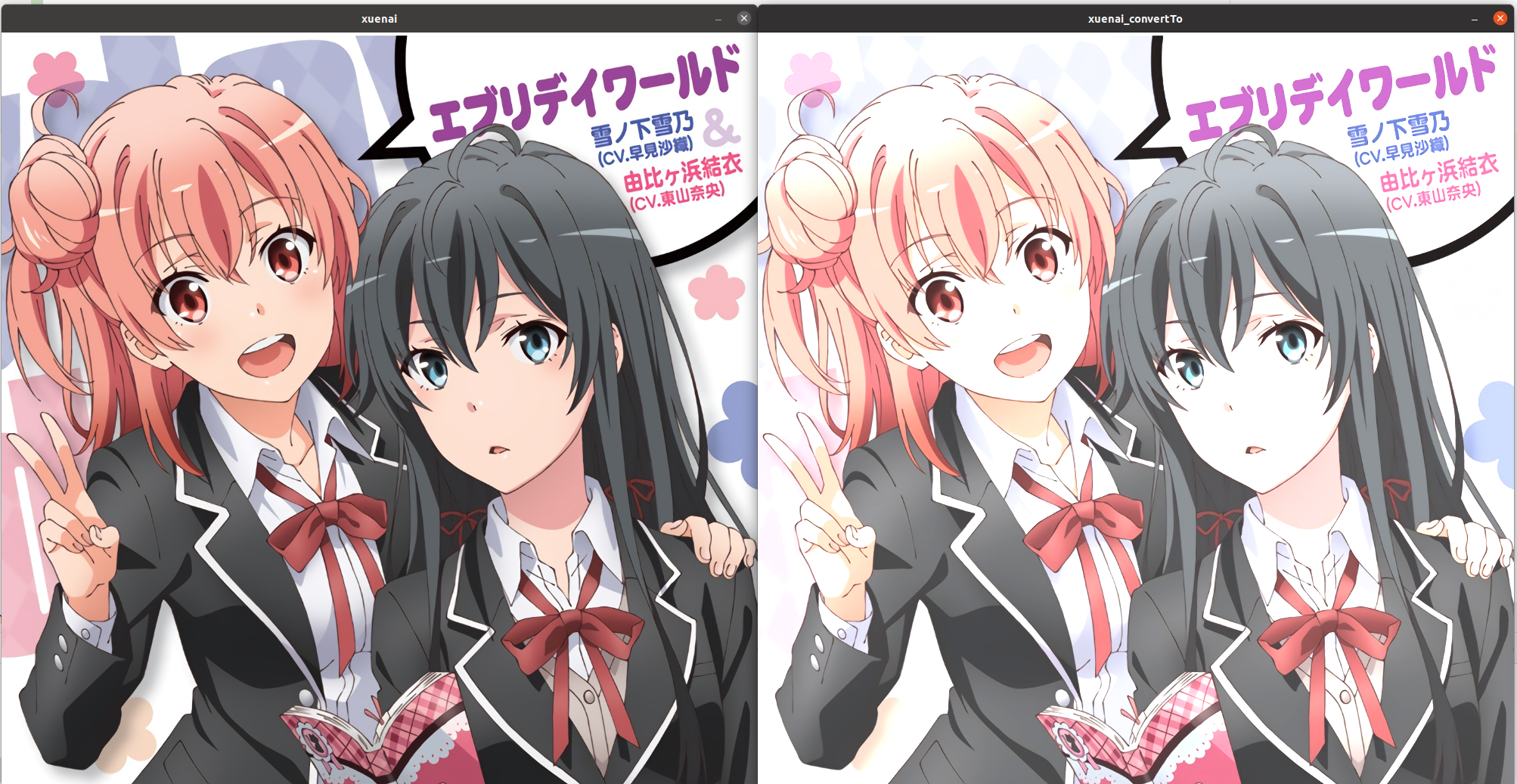
Mat xuenai = imread("xuenai.jpg");

imshow("xuenai", xuenai);

for(int i=0;i<xuenai.rows;i++){

for(int j=0;j<xuenai.cols;j++){

for(int k=0;k<xuenai.channels();k++) {

xuenai.at<Vec3b>(i, j)[k] = saturate_cast<uchar>(xuenai.at<Vec3b>(i, j)[k] * 1.2 + 30);

}

}

}

imshow("xuenai_convertTo",xuenai);

waitKey();
8.3 API
void Mat::convertTo( OutputArray m, int rtype, double alpha=1, double beta=0 ) const;
- 参数如下
| 参数 | 含义 |
| ------------------ | -------------------------------- |
| m(mat) | 输出图片 |
| rtype(result type) | 输出图片的深度,-1表示与原图一致 |
| alpha | 对应系数 |
| beta | 对应常数 |
- 不能进行原地运算
8.4 效果
Mat xuenai = imread("xuenai.jpg");

imshow("xuenai", xuenai);

xuenai.convertTo(xuenai,-1,1.2,30);

imshow("xuenai_convertTo",xuenai);

waitKey();
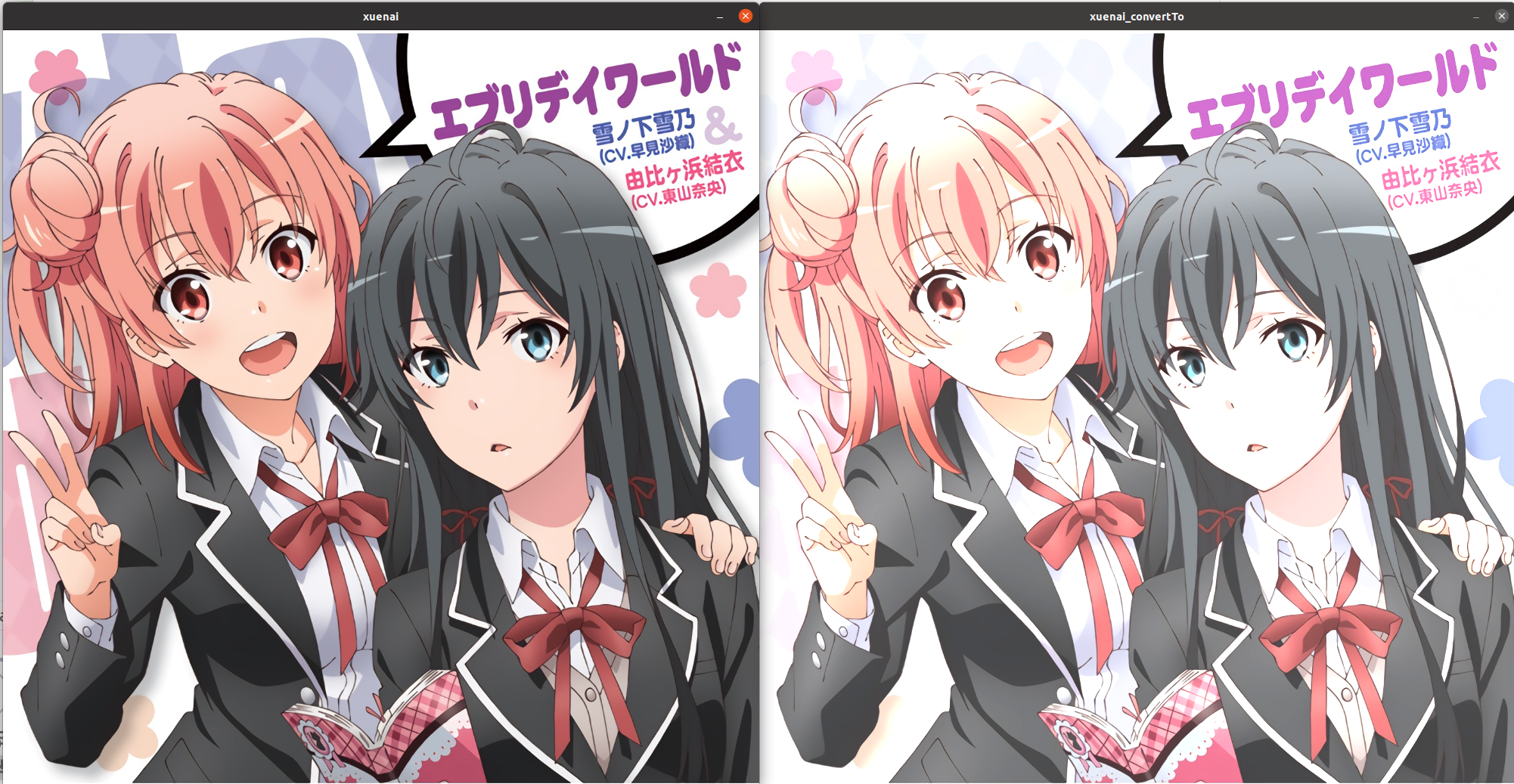
可以看到效果是一样的
9.图片混合
CV_EXPORTS_W void  addWeighted(InputArray src1, double alpha, InputArray src2,

double beta, double gamma, OutputArray dst, int dtype = -1);
- 参数如下
| 参数 | 含义 |
| ----------------------- | ---------------------------------------- |
| src(source1) | 输入图片1 |
| alpha | src1的权重 |
| src2(source2) | 输入图片2 |
| beta | src2的权重 |
| gamma | 额外的增量 |
| dst(destination) | 输出图片 |
| dtype(destination type) | 输出图片的数据类型,-1表示与输入图片一致 |
10.图片尺寸调整
CV_EXPORTS_W void  resize( InputArray src, OutputArray dst,

Size dsize, double fx = 0, double fy = 0,

int interpolation = INTER_LINEAR );
- 参数如下
| 参数 | 含义 |
| ----------------------- | ----------------------------------------------------------------------------------------- |
| src(source) | 输入图片 |
| dsize(destination size) | 输出图片的尺寸 |
| fx | x方向(width方向)的缩放比例,如果它是0,那么它就会按照(double)dsize.width/src.cols来计算 |
| fy | y方向(height方向)的缩放比例,如果它是0,那么它就会按照(double)dsize.height/src.rows来计算 |
| interpolation | 插值算法的选择 |
10.1 插值算法(not important)
enum  InterpolationFlags{

/** nearest neighbor interpolation */

INTER_NEAREST = 0,

/** bilinear interpolation */

INTER_LINEAR = 1,

/** bicubic interpolation */

INTER_CUBIC = 2,

/** resampling using pixel area relation. It may be a preferred method for image decimation, as

it gives moire'-free results. But when the image is zoomed, it is similar to the INTER_NEAREST

method. */

INTER_AREA = 3,

/** Lanczos interpolation over 8x8 neighborhood */

INTER_LANCZOS4 = 4,

/** Bit exact bilinear interpolation */

INTER_LINEAR_EXACT = 5,

/** Bit exact nearest neighbor interpolation. This will produce same results as

the nearest neighbor method in PIL, scikit-image or Matlab. */

INTER_NEAREST_EXACT = 6,

/** mask for interpolation codes */

INTER_MAX = 7,

/** flag, fills all of the destination image pixels. If some of them correspond to outliers in the

source image, they are set to zero */

WARP_FILL_OUTLIERS = 8,

/** flag, inverse transformation


For example, #linearPolar or #logPolar transforms:

- flag is __not__ set: \f$dst( \rho , \phi ) = src(x,y)\f$

- flag is set: \f$dst(x,y) = src( \rho , \phi )\f$

*/

WARP_INVERSE_MAP = 16

};
10.2 注意事项
使用注意事项:
- dsize和fx/fy不能同时为0
-
指定dsize的值,让fx和fy空置直接使用默认值。
-
让dsize为0,指定好fx和fy的值,比如fx=fy=0.5,那么就相当于把原图两个方向缩小一倍。
11.图像金字塔(常用于神经网络的池化层,对图像进行成倍的放大或缩小)
//缩小一倍

CV_EXPORTS_W void  pyrDown( InputArray src, OutputArray dst,

const Size& dstsize = Size(), int borderType = BORDER_DEFAULT );


//放大一倍

CV_EXPORTS_W void  pyrUp( InputArray src, OutputArray dst,

const Size& dstsize = Size(), int borderType = BORDER_DEFAULT );
- 参数如下
| 参数 | 含义 |
| ------------------------- | ------------------------------------------------------------------------------------- |
| src(source) | 输入图片 |
| dst(destination) | 输出图片 |
| dstsize(destination size) | 输出图片的尺寸,默认自动调整 |
| borderType | 边界填充方式,默认为黑边。如果没有设置dstsize,则不会出现黑边,因为已经进行了自动调整 |
12.二值化(对灰度图)
CV_EXPORTS_W double  threshold( InputArray src, OutputArray dst,

double thresh, double maxval, int type );
- 参数如下
| 参数 | 含义 |
| ----------------- | -------- |
| src(source) | 输入图片 |
| dst(destination) | 输出图片 |
| thresh(threshold) | 阈值 |
| maxval(max value) | 最大值 |
| type | 阈值类型 |
12.1 阈值类型
enum  ThresholdTypes {

THRESH_BINARY = 0, //!< \f[\texttt{dst} (x,y) = \fork{\texttt{maxval}}{if \(\texttt{src}(x,y) > \texttt{thresh}\)}{0}{otherwise}\f]

THRESH_BINARY_INV = 1, //!< \f[\texttt{dst} (x,y) = \fork{0}{if \(\texttt{src}(x,y) > \texttt{thresh}\)}{\texttt{maxval}}{otherwise}\f]

THRESH_TRUNC = 2, //!< \f[\texttt{dst} (x,y) = \fork{\texttt{threshold}}{if \(\texttt{src}(x,y) > \texttt{thresh}\)}{\texttt{src}(x,y)}{otherwise}\f]

THRESH_TOZERO = 3, //!< \f[\texttt{dst} (x,y) = \fork{\texttt{src}(x,y)}{if \(\texttt{src}(x,y) > \texttt{thresh}\)}{0}{otherwise}\f]

THRESH_TOZERO_INV = 4, //!< \f[\texttt{dst} (x,y) = \fork{0}{if \(\texttt{src}(x,y) > \texttt{thresh}\)}{\texttt{src}(x,y)}{otherwise}\f]

THRESH_MASK = 7,

THRESH_OTSU = 8, //!< flag, use Otsu algorithm to choose the optimal threshold value

THRESH_TRIANGLE = 16  //!< flag, use Triangle algorithm to choose the optimal threshold value

};
阈值二值化(Threshold Binary)
首先指定像素的灰度值的阈值,遍历图像中像素值,如果像素的灰度值大于这个阈值,则将这个像素设置为最大像素值(8位灰度值最大为255);若像素的灰度值小于阈值,则将该像素点像素值赋值为0。公式以及示意图如下:

阈值反二值化(Threshold Binary Inverted)
首先也要指定一个阈值,不同的是在对图像进行阈值化操作时与阈值二值化相反,当像素的灰度值超过这个阈值的时候为该像素点赋值为0;当该像素的灰度值低于该阈值时赋值为最大值。公式及示意图如下:

截断(Truncate)
给定像素值阈值,在图像中像素的灰度值大于该阈值的像素点被设置为该阈值,而小于该阈值的像素值保持不变。公式以及示意图如下:

阈值取零(Threshold To Zero)
与截断阈值化相反,像素点的灰度值如果大于该阈值则像素值不变,如果像素点的灰度值小于该阈值,则该像素值设置为0.公式以及示意图如下:

阈值反取零(Threshold To Zero Inverted)
像素值大于阈值的像素赋值为0,而小于该阈值的像素值则保持不变,公式以及示意图如下:

13.图片裁剪
13.1 方式一
inline

Mat Mat::operator()( const  Rect& roi ) const

{

return  Mat(*this, roi);

}
以下为实例
Mat xuenai = imread("xuenai.jpg");

resize(xuenai,xuenai,Size(1000,1000));

imshow("xuenai", xuenai);

Mat  tuanzi(xuenai,(Rect(0,0,500,1000)));

imshow("tuanzi",tuanzi);

waitKey();
13.2 方式二
Mat::Mat(const Mat& m, const Rect& roi);
以下为实例
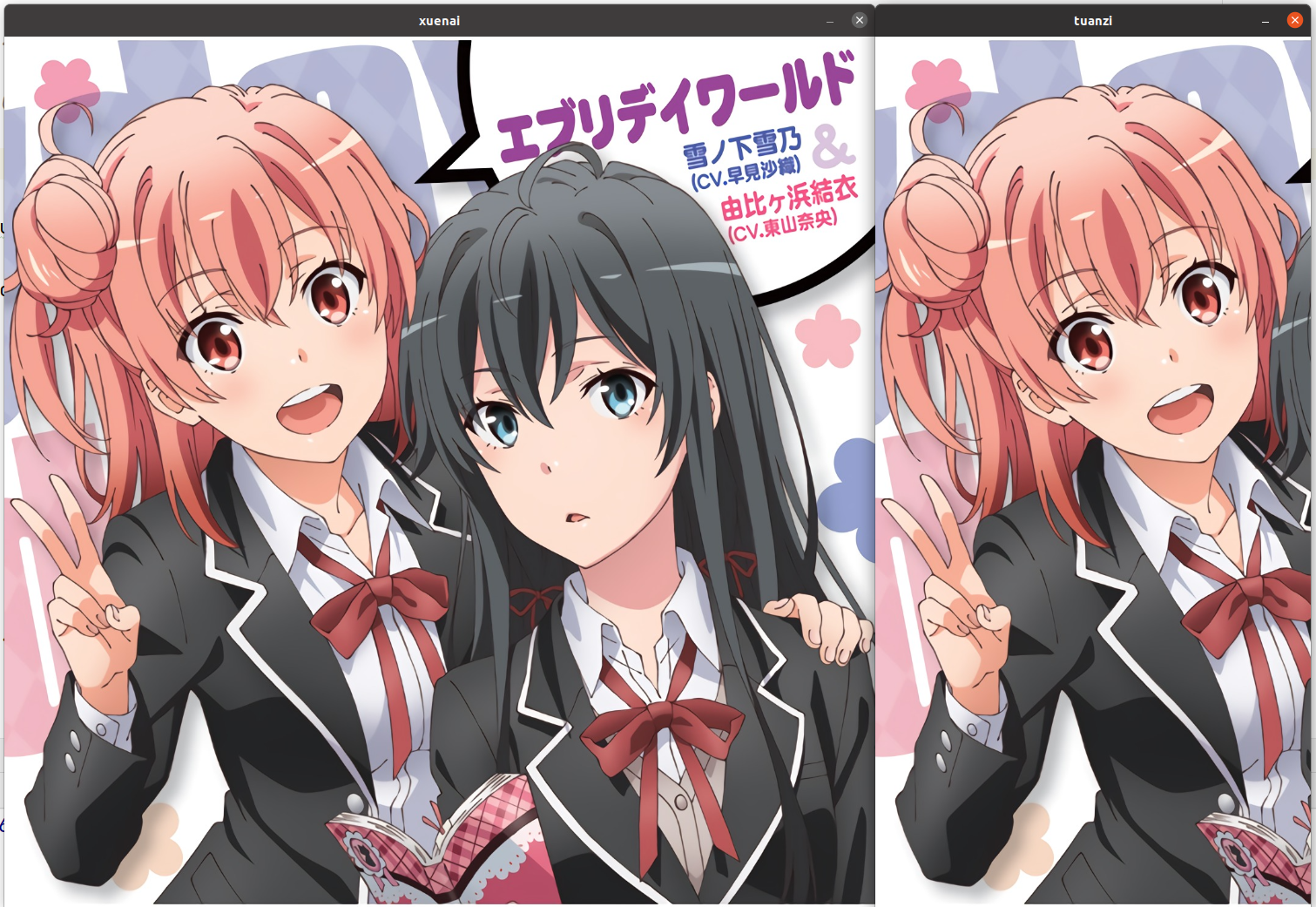
Mat xuenai = imread("xuenai.jpg");

resize(xuenai,xuenai,Size(1000,1000));

imshow("xuenai", xuenai);

Mat  tuanzi(xuenai(Rect(0,0,500,1000)));

imshow("tuanzi",tuanzi);

waitKey();
13.3 Rect类构造
template<typename  _Tp> inline

Rect_<_Tp>::Rect_(_Tp _x, _Tp _y, _Tp _width, _Tp _height)

: x(_x), y(_y), width(_width), height(_height) {}


template<typename  _Tp> inline

Rect_<_Tp>::Rect_(const Point_<_Tp>& org, const Size_<_Tp>& sz)

: x(org.x), y(org.y), width(sz.width), height(sz.height) {}


template<typename  _Tp> inline

Rect_<_Tp>::Rect_(const Point_<_Tp>& pt1, const Point_<_Tp>& pt2)

{

x = std::min(pt1.x, pt2.x);

y = std::min(pt1.y, pt2.y);

width = std::max(pt1.x, pt2.x) - x;

height = std::max(pt1.y, pt2.y) - y;

}
14.基本变换
14.1 翻转
CV_EXPORTS_W void flip(InputArray src, OutputArray dst, int flipCode);
- 参数如下
| 参数 | 含义 |
| ---------------- | ------------------ |
| src(source) | 输入图片 |
| dst(destination) | 输出图片 |
| flipCode | 翻转类型,参见下表 |
- flipCode 可选值如下
| flipCode 可选值 | 含义 |
| --------------- | ------------------------------ |
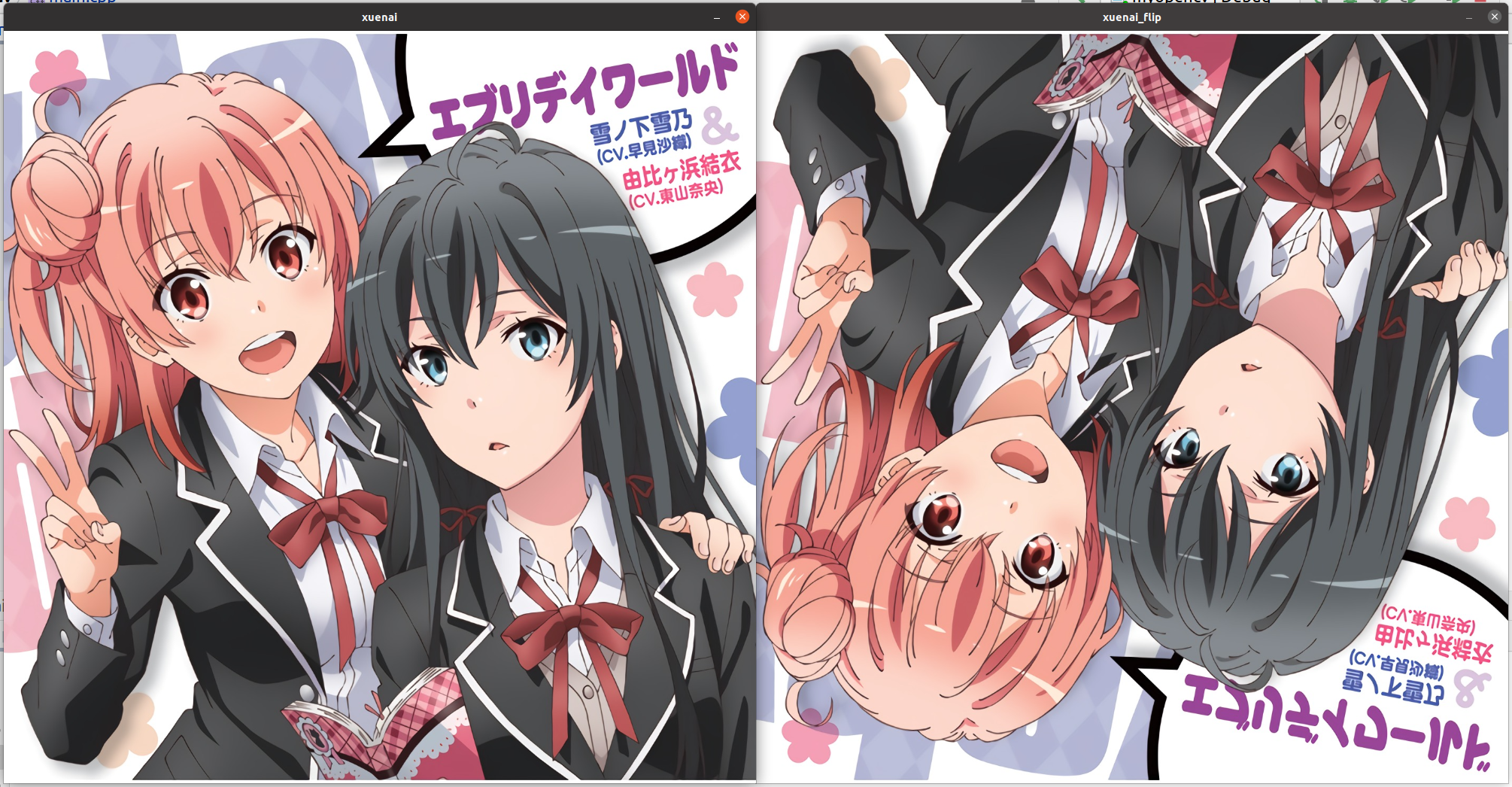
| flipcode==0 | 上下翻转 |
| flipcod>0 | 左右翻转 |
| flipcode<0 | 上下加左右翻转,等价于旋转180° |
效果
Mat xuenai = imread("xuenai.jpg");

imshow("xuenai", xuenai);

Mat  xuenai_flip(xuenai.size(), xuenai.type());

flip(xuenai, xuenai_flip, 0);

imshow("xuenai_flip", xuenai_flip);

waitKey();
14.2 90°旋转
CV_EXPORTS_W void  rotate(InputArray src, OutputArray dst, int rotateCode);

enum  RotateFlags {

ROTATE_90_CLOCKWISE = 0, //!<Rotate 90 degrees clockwise

ROTATE_180 = 1, //!<Rotate 180 degrees clockwise

ROTATE_90_COUNTERCLOCKWISE = 2, //!<Rotate 270 degrees clockwise

};
- 参数如下
| 参数 | 含义 |
| ---------------- | -------- |
| src(source) | 输入图片 |
| dst(destination) | 输出图片 |
| rotateCode | 旋转类型 |
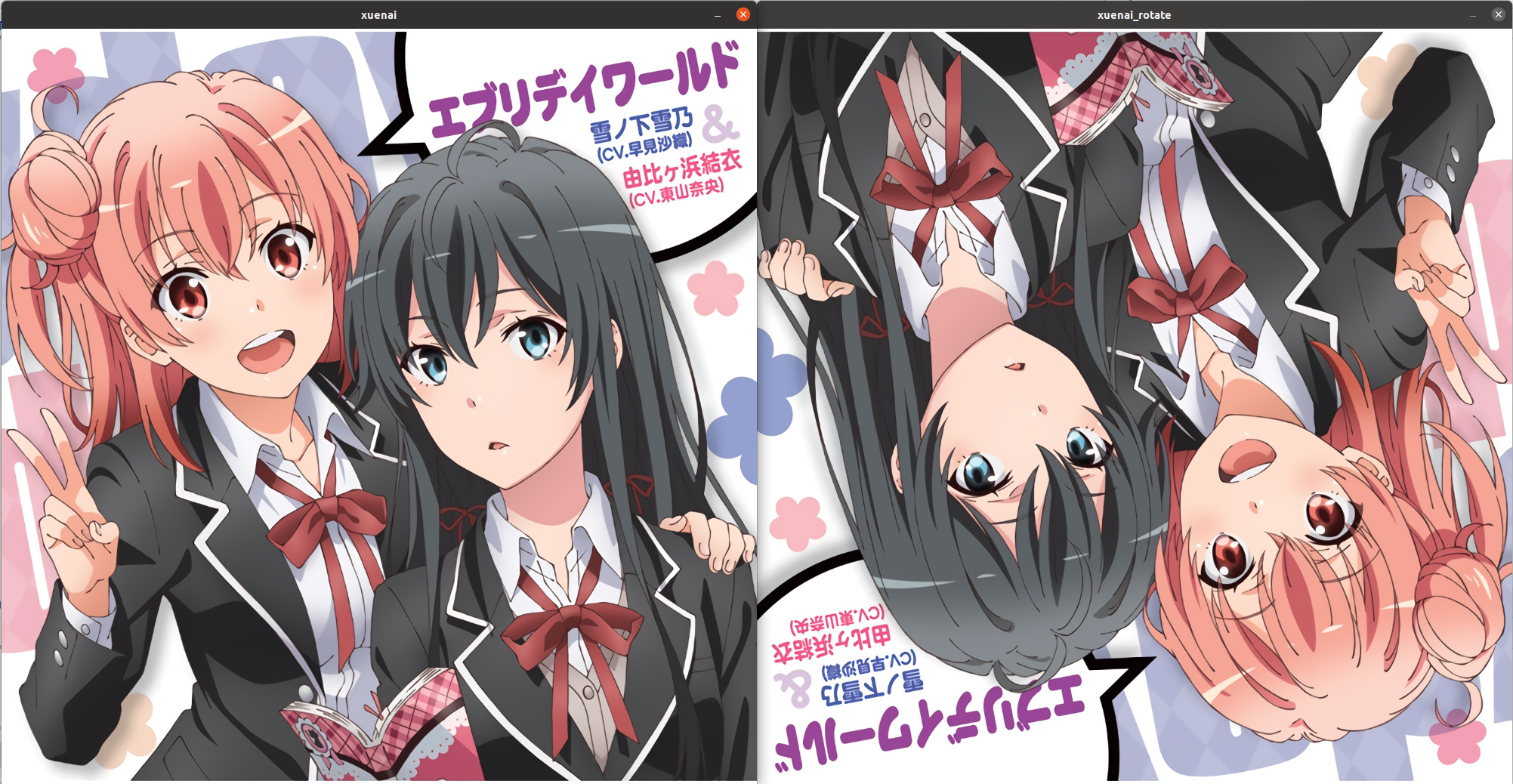
效果
Mat xuenai = imread("xuenai.jpg");

imshow("xuenai", xuenai);

Mat  xuenai_rotate(xuenai.size(), xuenai.type());

rotate(xuenai, xuenai_rotate, ROTATE_180);

imshow("xuenai_rotate", xuenai_rotate);

waitKey();
15.仿射变换
15.1 API
CV_EXPORTS_W void  warpAffine( InputArray src, OutputArray dst,

InputArray M, Size dsize,

int flags = INTER_LINEAR,

int borderMode = BORDER_CONSTANT,

const Scalar& borderValue = Scalar());
- 参数如下
| 参数 | 含义 |
| ----------------------- | ---------------------------------------------------------------------- |
| src(source) | 输入图片 |
| dst(destination) | 输出图片 |
| M | 变换矩阵 |
| dsize(destination size) | 输出图片的尺寸,若不对输出图片的尺寸进行调整,那么很可能会出现黑边 |
| flags | 插值算法 |
| borderMode | 边界外推法 |
| borderValue | 填充边界的值 |
15.2 平移
- 只需将变换矩阵M设置成如下形式:
float delta_x=200,delta_y=200;

float M_values[]={1,0,delta_x,

0,1,delta_y};

Mat  M(Size(3,2),CV_32F,M_values);
delta_x:x方向上的偏移量
delta_y:y方向上的偏移量
M_values:必须是浮点类型的数组对象
M:必须是CV_32F,不能用逗号式分隔创建
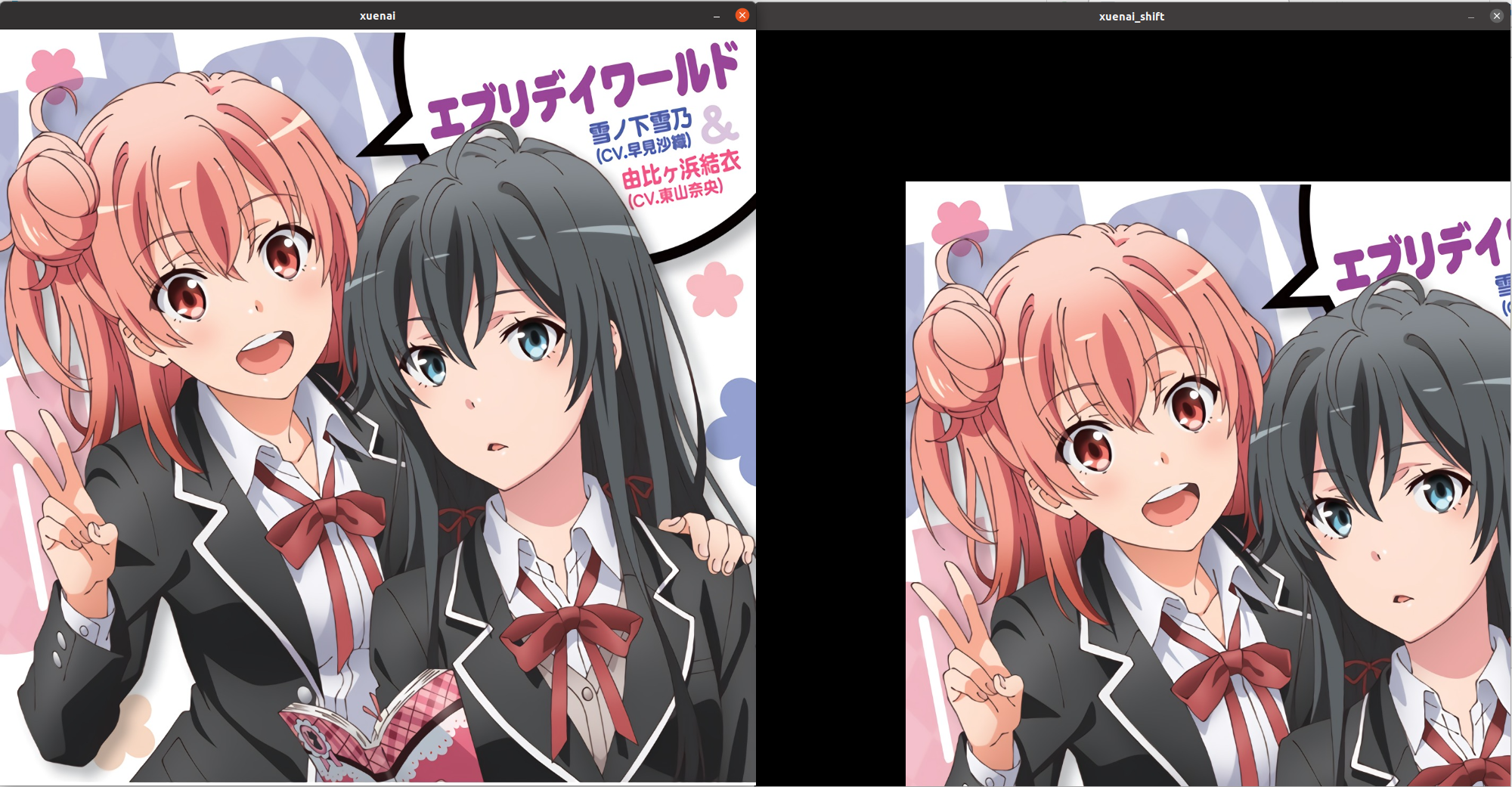
效果
Mat xuenai = imread("xuenai.jpg");

imshow("xuenai",xuenai);

double M_values[]={1,0,200,

0,1,200};

Mat  M(Size(3,2), CV_64F,M_values);

Mat  xuenai_shift(xuenai.size(),xuenai.type());

warpAffine(xuenai,xuenai_shift,M,xuenai.size());

imshow("xuenai_shift",xuenai_shift);

waitKey();
15.3 任意角度旋转
获得变换矩阵M
inline

Mat  getRotationMatrix2D(Point2f  center, double  angle, double  scale)

{

return  Mat(getRotationMatrix2D_(center, angle, scale), true);

}
- 参数如下
| 参数 | 含义 |
| ------ | ---------------- |
| center | 旋转中心点的坐标 |
| angle | 逆时针偏角 |
| scale | 生成图与原图之比 |
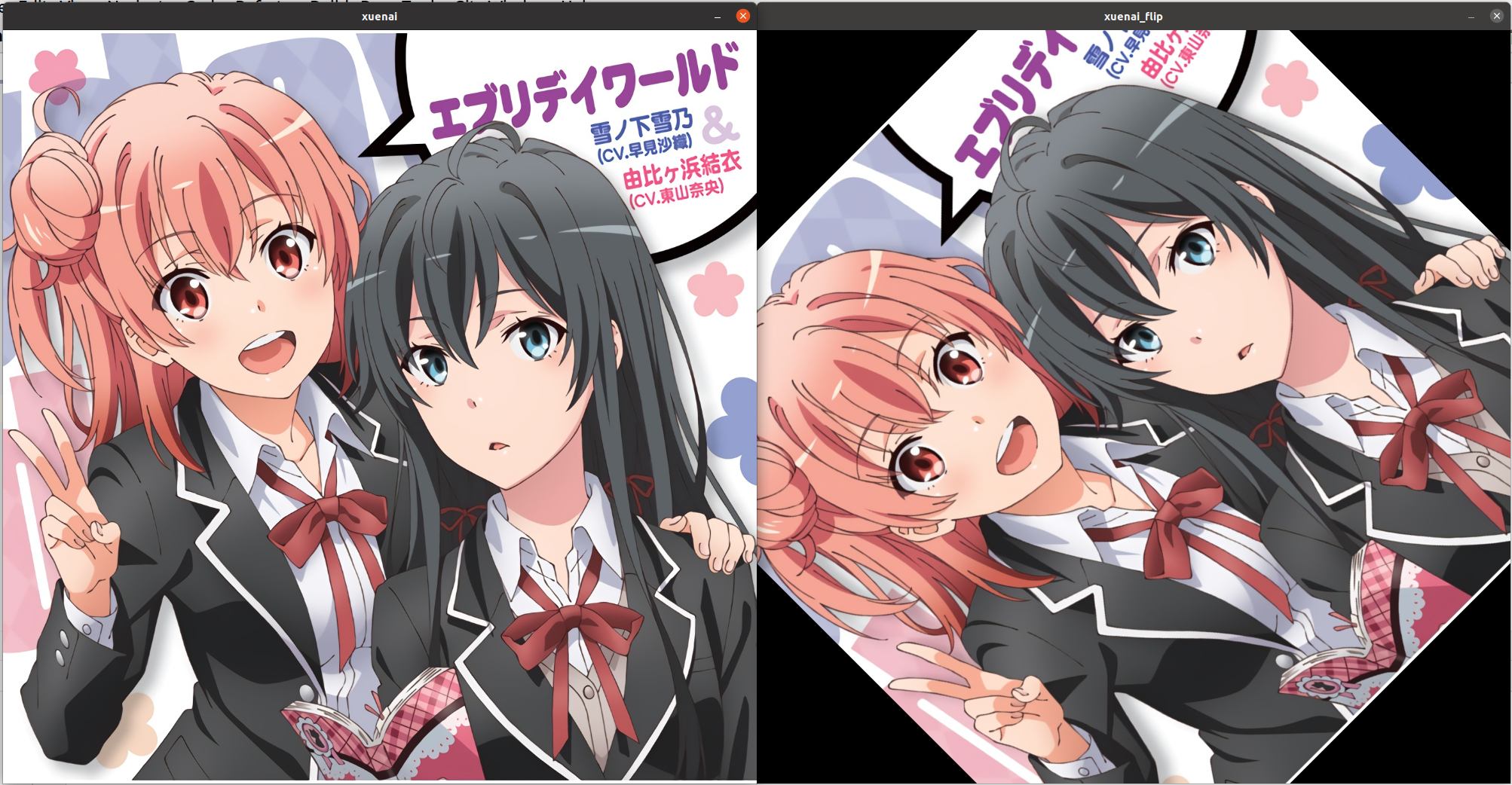
效果
Mat xuenai = imread("xuenai.jpg");

imshow("xuenai", xuenai);

Mat M= getRotationMatrix2D(Point2f(xuenai.cols/2,xuenai.rows/2),45,1);

Mat  xuenai_rotate(xuenai.size(),xuenai.type());

warpAffine(xuenai,xuenai_rotate,M,xuenai.size());

imshow("xuenai_flip",xuenai_rotate);
15.4 仿射(不破坏几何关系)
获得变换矩阵M
CV_EXPORTS Mat getAffineTransform( const Point2f src[], const Point2f dst[] );
- 参数如下
| 参数 | 含义 |
| --------------------- | ------------------------------------ |
| src[](source[]) | 输入图片的坐标点集,含三个坐标点 |
| dst[](destination[]) | 三个坐标点变换的目标位置 |
- 三个点要一一对应
16.透射变换(破坏几何关系)
16.1 API
进行变换
CV_EXPORTS_W void  warpPerspective( InputArray src, OutputArray dst,

InputArray M, Size dsize,

int flags = INTER_LINEAR,

int borderMode = BORDER_CONSTANT,

const Scalar& borderValue = Scalar());
- 参数如下
| 参数 | 含义 |
| ----------------------- | ---------------------------------------------------------------------- |
| src(source) | 输入图片 |
| dst(destination) | 输出图片 |
| M | 变换矩阵 |
| dsize(destination size) | 输出图片的尺寸,若不对输出图片的尺寸进行调整,那么很可能会出现黑边 |
| flags | 插值算法 |
| borderMode | 边界外推法 |
| borderValue | 填充边界的值 |
已知变换后图片,逆推变换矩阵M
CV_EXPORTS_W Mat getPerspectiveTransform(InputArray src, InputArray dst, int solveMethod = DECOMP_LU);
- 参数如下
| 参数 | 含义 |
| ---------------- | -------- |
| src(source) | 输入图片 |
| dst(destination) | 输出图片 |
获得变换矩阵M
CV_EXPORTS Mat getPerspectiveTransform(const Point2f src[], const Point2f dst[], int solveMethod = DECOMP_LU);
- 参数如下
| 参数 | 含义 |
| --------------------- | ------------------------------------ |
| src[](source[]) | 输入图片的坐标点集,含四个坐标点 |
| dst[](destination[]) | 三个坐标点变换的目标位置 |
- 四个点要一一对应
16.2 效果
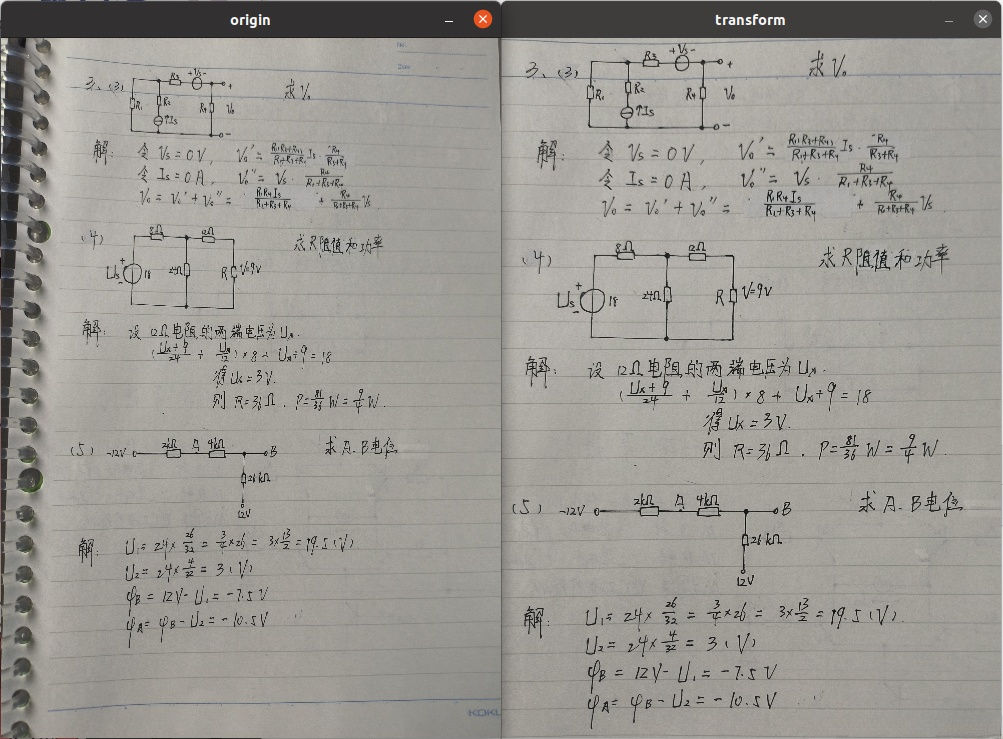
Mat origin = imread("origin.jpg");

Point2f point2F_origin[4]={Point2f (405,105),Point2f(2469,217),Point2f(2573,3489),Point2f(349,3547)};

Point2f point2F_tansform[4]={Point2f (0,0),Point2f(2500,0),Point2f(2500,3500),Point2f(0,3500)};

Mat M=getPerspectiveTransform(point2F_origin,point2F_tansform);

Mat  transfrom(origin.size(),origin.type());

warpPerspective(origin,transfrom,M,Size(2500,3500));

resize(origin,origin,Size(500,700));

resize(transfrom,transfrom,Size(500,700));

imshow("origin",origin);

imshow("transform",transfrom);
 随时随地看视频