前言:
目前大部分业务开发中,ElasticSearch主要还是用来做搜索。而支撑搜索功能的数据结构比较单一,不会有数据嵌套或者多种关联之类的。尽管没有,但是有些小众需求可能还会有一对多查询的场景。为了实现和MySQL的Join类似的查询方式,以下以ES的父子文档方式储存,并详细演示Logstash如何将MySQL的多张有关联的表同步到ES的父子文档。
手动演示:
以下以restful方式创建父子文档索引,并以简单的方式查询类似join的数据返回。下面所有演示的索引名称都为 "my_join_index"。
1. 创建父子关联索引
PUT my_join_index
{  "mappings": {    "properties": {        "my_join_field": {
          "type": "join",          "relations": {            "question": "answer"
          }
        }
      }
  }
}
2. 创建父文档
PUT my_join_index/_doc/1?refresh
{  "text": "This is a question",  "my_join_field": "question" }


PUT my_join_index/_doc/2?refresh
{  "text": "This is another question",  "my_join_field": "question"}
3. 创建子文档
PUT my_join_index/_doc/3?routing=1&refresh
{  "text": "This is an answer",  "my_join_field": {    "name": "answer",
    "parent": "1"
  }
}


PUT my_join_index/_doc/4?routing=1&refresh
{  "text": "This is another answer2",  "my_join_field": {    "name": "answer",    "parent": "2"
  }
}
4. 全局检索
GET my_join_index/_search
{  "query": {    "match_all": {}
  },  "sort": ["_id"]
}
5. 根据父文档查找子文档
GET my_join_index/_search
{    "query": {        "has_parent" : {            "parent_type" : "question",            "query" : {                "match" : {                    "text" : "This is"
                }
            }
        }
    }
}
6. 根据子文档查找父文档
GET my_join_index/_search
{"query": {        "has_child" : {            "type" : "answer",            "query" : {                "match" : {                    "text" : "This is question"
                }
            }
        }
    }
}
7. Join聚合
GET my_join_index/_search
{  "query": {    "parent_id": {
      "type": "answer",      "id": "1"
    }
  },  "aggs": {    "parents": {      "terms": {        "field": "my_join_field#question",
        "size": 10
      }
    }
  },  "script_fields": {    "parent": {      "script": {         "source": "doc['my_join_field#question']"
      }
    }
  }
}
8. 单条联合查询, 可以是一条父文档对应多个子文档
GET my_join_index/_search
{  "query": {    "bool": {      "must": [
        {          "match": {              "title": "历史圈"
          }
        },
        {          "has_child": {            "type": "answer",            "query": {              "match": {                "text":"是的"
              }
            },            "inner_hits":{}
          }
        }
      ]
    }
  }
}
Logstash同步:
以下以文章分类表和文章表为例,二者系一对多的关系。同步文档时,文章分类作为父文档,文章作为子文档,关联字段为 “my_join_field”。
1. 创建有父子文档的索引
PUT hhyp_article
{  "mappings": {    "properties": {      "my_join_field": {
        "type": "join",        "relations": {          "article_cate": "article"
        }
      }
    }
  }
}
2. 配置同步代码
input {

    stdin {

    }

	jdbc {

      # mysql 数据库链接,shop为数据库名
      jdbc_connection_string => "jdbc:mysql://127.0.0.1:3306/rebuild?characterEncoding=UTF-8&useSSL=false"

      # 用户名和密码
      jdbc_user => "root"

      jdbc_password => "root"

      # 驱动
      jdbc_driver_library => "E:/2setsoft/1dev/logstash-7.8.0/mysqletc/mysql-connector-java-5.1.7-bin.jar"

      # 驱动类名
      jdbc_driver_class => "com.mysql.jdbc.Driver"

      jdbc_paging_enabled => "true"
      jdbc_page_size => "50000"

	  parameters => {"number" => "200"}

	  statement => "SELECT * FROM `hhyp_article` WHERE delete_time = 0"

	  # 是否将字段名转换为小写,默认true(如果有数据序列化、反序列化需求,建议改为false);
      lowercase_column_names => false

	  # Value can be any of: fatal,error,warn,info,debug,默认info;
	  sql_log_level => warn


      # 设置监听间隔  各字段含义(由左至右)分、时、天、月、年,全部为*默认含义为每分钟都更新
      schedule => "* * * * *"

      # 索引类型
      type => "article"
    }

	jdbc {

      # mysql 数据库链接,shop为数据库名
      jdbc_connection_string => "jdbc:mysql://127.0.0.1:3306/rebuild?characterEncoding=UTF-8&useSSL=false"

      # 用户名和密码
      jdbc_user => "root"
      jdbc_password => "root"

      # 驱动
      jdbc_driver_library => "E:/2setsoft/1dev/logstash-7.8.0/mysqletc/mysql-connector-java-5.1.7-bin.jar"

      # 驱动类名
      jdbc_driver_class => "com.mysql.jdbc.Driver"

      jdbc_paging_enabled => "true"
      jdbc_page_size => "50000"

	  parameters => {"number" => "200"}

	  statement => "SELECT * FROM `hhyp_article_cate` WHERE delete_time = 0"

	  # 是否将字段名转换为小写,默认true(如果有数据序列化、反序列化需求,建议改为false);
      lowercase_column_names => false

	  # Value can be any of: fatal,error,warn,info,debug,默认info;
	  sql_log_level => warn

      # 设置监听间隔  各字段含义(由左至右)分、时、天、月、年,全部为*默认含义为每分钟都更新
      schedule => "* * * * *"

      # 索引类型
      type => "article_cate"
    }
}

filter {  if [type]=="article_cate" {
	  mutate {
			add_field => { "my_join_field" => "article_cate" }
	  }
	}
	if [type]=="article" {
	  mutate {
			add_field => {"[my_join_field][name]" => "article"}

			#catalog_id 子表的父id
			add_field => {"[my_join_field][parent]" => "%{cid}"}
	  }
	}

}

output {
	if[type] == "article_cate" {
		elasticsearch {
			hosts => "localhost:9200"
			index => "hhyp_article"
			document_type => "_doc"
			document_id => "%{id}"
		}
    }
    if[type] == "article" {
		elasticsearch {
			hosts => "localhost:9200"
			index => "hhyp_article"
			document_type => "_doc"
			document_id => "%{id}"
			routing => "%{cid}"
		}
	}

    stdout {
        codec => json_lines
    }

}
3. 运行命令开始同步
bin\logstash -f mysql\mysql.conf
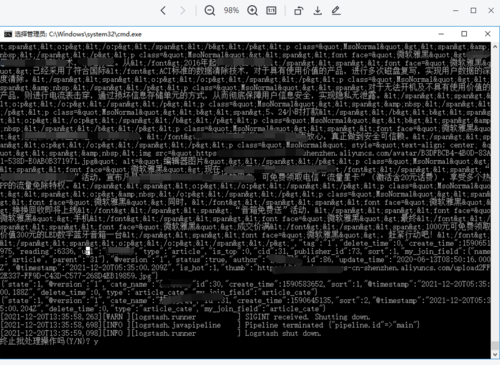
4. 通过搜索父文档标题查询子文档数据

 随时随地看视频