
(2)实时视频及全景漫游的实现:
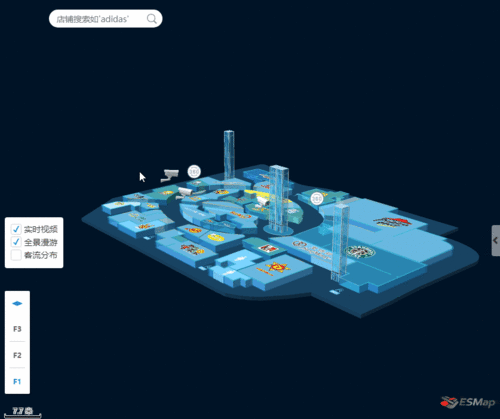
首先创建实时视频的摄像头图片标注和全景漫游的360°图片标注,标注实现后可在地图上点击相应的图片标注从而显示实时视频画面或360°全景画面,画面可拖拽可放大缩小。
各楼层实时视频的摄像头图片标注:

//创建各楼层摄像头标注function showCameras() {    var url = 'data/test666/model/camera1.js';    //json数据,定义摄像头所在楼层和位置
    var infos = [{
        fnum: 1,
        cameras: [{
                x: 12683472.409512023,
                y: 2557870.1781415385,
            },
            {
                x: 12683450.258123305,
                y: 2557858.104209115
            },
            {
                x: 12683430.863774385,
                y: 2557865.8999765064
            }
        ]
    }, {
        fnum: 2,
        cameras: [{
                x: 12683472.409512023,
                y: 2557870.1781415385,
            },
            {
                x: 12683450.258123305,
                y: 2557858.104209115
            },
            {
                x: 12683430.863774385,
                y: 2557865.8999765064
            }
        ]
    }, {
        fnum: 3,
        cameras: [{
                x: 12683472.409512023,
                y: 2557870.1781415385,
            },
            {
                x: 12683450.258123305,
                y: 2557858.104209115
            },
            {
                x: 12683430.863774385,
                y: 2557865.8999765064
            }
        ]
    }];    //创建三维模型标注  实时视频摄像头
    var ang = 0;
    infos.forEach(function (info) {        var floorLayer = map.getFloor(info.fnum);        var layer = floorLayer.getOrCreateLayerByName("cameras", esmap.ESLayerType.MODEL3D);        var _id = 1;
        info.cameras.forEach(function (camera) {            var im = new esmap.ES3DMarker({
                x: camera.x,
                y: camera.y,
                id: _id++,
                name: "camera",
                url: url,
                size: 44,
                angle: ang,
                height: 3,
                showLevel: 16,
                spritify: true
            });
            ang += 30;
            layer.addMarker(im);//一个楼层共用一个图层        });
        layer && layer.show3D();
    });
}
点击地图展示实时视频或全景漫游弹框(div)函数active():
//地图点击标注后  临时创建div盒子  放全景图或实时视频function active(e, type) { // type: 1.pano; 0.videovar cc = $($(".drag")[0]).clone();    var wid = $(".drag").width();

    $("body").append(cc);
    cc[0].style.display = "block";    if (__xx < wid) {
        __xx = wid;
    }
    cc[0].style.left = (__xx - wid - 20).toString() + "px";
    cc[0].style.top = (__yy - 25 / 2).toString() + "px";    if (!type) {
        cc.find('.content')[0].innerHTML = '<video class="video_" src="videos/' + e.id_ + '.mp4" autoplay loop></video>';
        cc.find('.title h2')[0].innerHTML = '实时视频';
        createPopBox();
    } else {
        cc.find('.title h2')[0].innerHTML = '全景展示';

        var box = document.createElement('div');

        cc.find('.content').append(box);
        box.className = 'psv-box';

        oPano = new CreatePanorama({
            container: box,
            panorama: 'image/pano/' + e.id + '/',
            six: 1
        })
        createPopBox(oPano);
    }
}
展示的弹框可拖拽、大小可调整,功能实现如下函数:
/*可拖拽可放大缩小弹框*/function createPopBox(pano) { // pano: 0.视频,1.全景
    /*-------------------------- +
    获取id, class, tagName 函数
    +-------------------------- */
    var get = {
        byId: function (id) {            return typeof id === "string" ? document.getElementById(id) : id;
        },
        byClass: function (sClass, oParent) {            var aClass = [];            var reClass = new RegExp("(^| )" + sClass + "( |$)");            var aElem = this.byTagName("*", oParent);            for (var i = 0; i < aElem.length; i++) reClass.test(aElem[i].className) && aClass.push(aElem[i]);            return aClass
        },
        byTagName: function (elem, obj) {            return (obj || document).getElementsByTagName(elem);
        }
    };    var dragMinWidth = 250;    var dragMinHeight = 173;    /*-------------------------- +
    拖拽函数
    +-------------------------- */
    function drag(oDrag, handle) {        var disX = dixY = 0;        var oMax = get.byClass("max", oDrag)[0];//获取最大化div的 class
        var oRevert = get.byClass("revert", oDrag)[0];//获取恢复div的 class
        var oClose = get.byClass("close", oDrag)[0];//获取关闭div的  class
        handle = handle || oDrag;
        handle.style.cursor = "move";
        handle.onmousedown = function (event) {            var event = event || window.event;
            disX = event.clientX - oDrag.offsetLeft;
            disY = event.clientY - oDrag.offsetTop;

            document.onmousemove = function (event) {                var event = event || window.event;                var iL = event.clientX - disX;                var iT = event.clientY - disY;                var maxL = document.documentElement.clientWidth - oDrag.offsetWidth;                var maxT = document.documentElement.clientHeight - oDrag.offsetHeight;

                iL <= 0 && (iL = 0);
                iT <= 0 && (iT = 0);
                iL >= maxL && (iL = maxL);
                iT >= maxT && (iT = maxT);

                oDrag.style.left = iL + "px";
                oDrag.style.top = iT + "px";                return false
            };
            document.onmouseup = function () {
                document.onmousemove = null;
                document.onmouseup = null;                this.releaseCapture && this.releaseCapture()
            };            this.setCapture && this.setCapture();            return false
        };        //最大化按钮
        oMax.onclick = function () {            if (!pano) {
                $(this).parents('.drag').find('.video_')[0].webkitEnterFullscreen(true);
            } else {
                fullPano = 1;
                oDrag.classList.add('over-auto');                var _box = $(oDrag).find('.psv-box')[0];

                _box.classList.add('psv-full', 'over-auto');                var _div = document.createElement('div');
                document.body.append(_div);
                _div.className = 'psv-full-btns';
                _div.innerHTML = '<a class="full-revert" href="javascript:;" title="还原"></a>'

                document.onkeydown = function (e) {                    if (e.keyCode == 27 && fullPano == 1) {
                        fullPano = 0;
                        oDrag.classList.remove('over-auto');
                        _box.classList.remove('psv-full', 'over-auto');
                        _div.remove();
                        pano.onWindowResize();
                    }
                }

                $(_div).find('.full-revert').click(function () {
                    fullPano = 0;
                    oDrag.classList.remove('over-auto');
                    _box.classList.remove('psv-full', 'over-auto');
                    _div.remove();
                    pano.onWindowResize();
                })

                pano.onWindowResize();
            }
        };        //还原按钮
        oRevert.onclick = function () {
            oDrag.style.width = dragMinWidth + "px";
            oDrag.style.height = dragMinHeight + "px";
            oDrag.style.left = (document.documentElement.clientWidth - oDrag.offsetWidth) / 2 + "px";
            oDrag.style.top = (document.documentElement.clientHeight - oDrag.offsetHeight) / 2 + "px";            this.style.display = "none";
            oMax.style.display = "block";
            pano && pano.onWindowResize();
        };        //关闭按钮
        oClose.onclick = function () {            if (!pano) {
                $(this).parents('.drag').remove();
            } else {
                oPano = null;
                $(this).parents('.drag').remove();
            }
        };        //阻止冒泡
        oMax.onmousedown = oClose.onmousedown = function (event) {            this.onfocus = function () {                this.blur();
            };
            (event || window.event).cancelBubble = true
        };
    }    /*-------------------------- +
    改变大小函数
    +-------------------------- */
    function resize(oParent, handle, isLeft, isTop, lockX, lockY) {
        handle.onmousedown = function (event) {            var event = event || window.event;            var disX = event.clientX - handle.offsetLeft;            var disY = event.clientY - handle.offsetTop;            var iParentTop = oParent.offsetTop;            var iParentLeft = oParent.offsetLeft;            var iParentWidth = oParent.offsetWidth;            var iParentHeight = oParent.offsetHeight;

            document.onmousemove = function (event) {                var event = event || window.event;                var iL = event.clientX - disX;                var iT = event.clientY - disY;                var maxW = document.documentElement.clientWidth - oParent.offsetLeft - 2;                var maxH = document.documentElement.clientHeight - oParent.offsetTop - 2;                var iW = isLeft ? iParentWidth - iL : handle.offsetWidth + iL;                var iH = isTop ? iParentHeight - iT : handle.offsetHeight + iT;

                isLeft && (oParent.style.left = iParentLeft + iL + "px");
                isTop && (oParent.style.top = iParentTop + iT + "px");

                iW < dragMinWidth && (iW = dragMinWidth);
                iW > maxW && (iW = maxW);
                lockX || (oParent.style.width = iW + "px");

                iH < dragMinHeight && (iH = dragMinHeight);
                iH > maxH && (iH = maxH);
                lockY || (oParent.style.height = iH + "px");                if ((isLeft && iW == dragMinWidth) || (isTop && iH == dragMinHeight)) document.onmousemove = null;

                pano && pano.onWindowResize();                return false;
            };
            document.onmouseup = function () {
                document.onmousemove = null;
                document.onmouseup = null;
            };            return false;
        }
    };    function aaa() {        var dom = document.getElementsByClassName("drag");        var oDrag = dom[dom.length - 1];        var oTitle = get.byClass("title", oDrag)[0];        var oL = get.byClass("resizeL", oDrag)[0];        var oT = get.byClass("resizeT", oDrag)[0];        var oR = get.byClass("resizeR", oDrag)[0];        var oB = get.byClass("resizeB", oDrag)[0];        var oLT = get.byClass("resizeLT", oDrag)[0];        var oTR = get.byClass("resizeTR", oDrag)[0];        var oBR = get.byClass("resizeBR", oDrag)[0];        var oLB = get.byClass("resizeLB", oDrag)[0];

        drag(oDrag, oTitle);        //拉四角
        resize(oDrag, oLT, true, true, false, false);
        resize(oDrag, oTR, false, true, false, false);
        resize(oDrag, oBR, false, false, false, false);
        resize(oDrag, oLB, true, false, false, false);        //拉四边
        resize(oDrag, oL, true, false, false, true);
        resize(oDrag, oT, false, true, true, false);
        resize(oDrag, oR, false, false, false, true);
        resize(oDrag, oB, false, false, true, false);

        oDrag.style.left = (document.documentElement.clientWidth - oDrag.offsetWidth) / 2 + "px";
        oDrag.style.top = (document.documentElement.clientHeight - oDrag.offsetHeight) / 2 + "px";
    }
    aaa();
}
功能都实现后投入使用,点击地图上的标注显示相应的实时视频,这里我使用了ESMap的地图点击事件map.on(“mapClickNode”,function(){});
 map.on("mapClickNode", function (e) {
        removeAll();        if (e.nodeType && e.nodeType == 31 && e.name && e.name == 'myMarker') {//全景
            active(e, 1);
        }        if (e.nodeType && e.nodeType == 6 && e.name && e.name == 'camera') {//视频            active(e)
        }        if (e.nodeType && e.nodeType == 5) {//点击地图商铺显示相应运营情况
            if (e.name) {                var obj = {
                    id: e.ID,
                    fnum: e.FloorNum,
                    x: e.x,
                    y: e.y,
                    name: e.name
                }
                searchClick(obj);// 函数如下
} } })
封装气泡标注函数searchClick(),显示商铺信息:
function searchClick(data, isAddImageMarker) {    if (!data.name) return;    // 添加pop    removeAll();    var floorLayer = map.getFloor(data.fnum);    if (isAddImageMarker) {
        floorControl.changeFocusFloor(data.fnum);
    }    if (data.name == '房间') {        var dom = '<div class="pop-content"><strong>房间 ' + data.id + '</strong><p>经度:' + data.x.toFixed(3) + '</p><p>纬度:' + data.y.toFixed(3) + '</p></div>';
    } else {        var shopDatas = getShopMsg(data.id);//数字number
        var dom = '<div class="pop-content"><strong>' + data.name + '</strong><p>人流量:' + shopDatas.msgA + '</p><p>营业额:' + shopDatas.msgB + '</p></div>'
    }    //添加信息窗
    popMarker = new esmap.ESPopMarker({
        mapCoord: {            //设置弹框的x轴            x: data.x,            //设置弹框的y轴            y: data.y,
            height: 1, //控制信息窗的高度
            //设置弹框位于的楼层            fnum: data.fnum
        },        //设置弹框的宽度
        width: 200,        //设置弹框的高度
        height: 120,
        marginTop: 10,        //设置弹框的内容        content: dom,        // content: '<input id="pop-input" type="text"/>',
        closeCallBack: function () {            //信息窗点击关闭操作
            // alert('信息窗关闭了!');        },
    });
    $(".es-control-popmarker input").val(''); // 手动添加close按钮value}
效果图如下:
各楼层全景漫游的360°图片标注:
//创建360°图片标注到各层function showImageMarker() {    var _arr = [{
        fnum: 1,
        node: [{
                x: 12683473.823037906,
                y: 2557891.805802924,
            },
            {
                x: 12683424.1333389,
                y: 2557880.7494297,
            }
        ]
    }, {
        fnum: 2,
        node: [{
                x: 12683473.823037906,
                y: 2557891.805802924,
            },
            {
                x: 12683424.1333389,
                y: 2557880.7494297,
            }
        ]
    }, {
        fnum: 3,
        node: [{
                x: 12683473.823037906,
                y: 2557891.805802924,
            },
            {
                x: 12683424.1333389,
                y: 2557880.7494297,
            }
        ]
    }]    for (var el of _arr) {        var floorLayer = map.getFloor(el.fnum);        var im_layer = new esmap.ESLayer('imageMarker');//创建图层
        im_layer.name = 'mylayer';//给图层命名
        var index = 1;        for (var el2 of el.node) {            var im = new esmap.ESImageMarker({
                x: el2.x,
                y: el2.y,
                url: 'image/360.png',
                id: index++,
                size: 50,
                name: 'myMarker',
                zoom: 2,
            })
            im_layer.addMarker(im);
            floorLayer.addLayer(im_layer);
        }
    }
}
图片标注创建后,使用three.JS创建全景图,然后绑定鼠标事件
function CreatePanorama(prop) {    var camera, scene, renderer, container, mesh;    var texture_placeholder,
        target = new THREE.Vector3();//创建3维向量

    this.container = container;    this.panorama = prop.panorama;    this.camera = camera;    this.scene = scene;    this.renderer = renderer;    this.mesh = mesh;    function init() {
        container = prop.container;
        camera = new THREE.PerspectiveCamera(75, container.clientWidth / container.clientHeight, 1, 1100);
        scene = new THREE.Scene();
        texture_placeholder = document.createElement('canvas');
        texture_placeholder.width = 128;
        texture_placeholder.height = 128;        var context = texture_placeholder.getContext('2d');
        context.fillStyle = 'rgb( 200, 200, 200 )';
        context.fillRect(0, 0, texture_placeholder.width, texture_placeholder.height);        if (prop.six) {            var materials = [
       loadTexture(prop.panorama + 'r.jpg'), // right
                loadTexture(prop.panorama + 'l.jpg'), // left
                loadTexture(prop.panorama + 'u.jpg'), // top
                loadTexture(prop.panorama + 'd.jpg'), // bottom
                loadTexture(prop.panorama + 'b.jpg'), // back
                loadTexture(prop.panorama + 'f.jpg') // front            ];            var matss = new THREE.MultiMaterial(materials)
            mesh = new THREE.Mesh(new THREE.BoxGeometry(300, 300, 300, 7, 7, 7), matss);
        } else {            var geometry = new THREE.SphereGeometry(100, 64, 64, -1.5707963267948966);            var material = new THREE.MeshBasicMaterial({
                map: new THREE.TextureLoader().load(prop.panorama),
            })
            mesh = new THREE.Mesh(geometry, material);
        }
        mesh.scale.x = -1;
        scene.add(mesh);

        renderer = new THREE.WebGLRenderer({//创建一个webGL渲染器,renderer
            antialias: true
        })
        renderer.setPixelRatio(window.devicePixelRatio);//设备设置像素比
        renderer.setSize(container.clientWidth, container.clientHeight);//调整输出canvas尺寸
        container.appendChild(renderer.domElement);        //监听鼠标各种事件
           container.addEventListener('mousedown', onDocumentMouseDown, false);
        container.addEventListener('mousemove', onDocumentMouseMove, false);
        container.addEventListener('mouseup', onDocumentMouseUp, false);
        container.addEventListener('wheel', onDocumentMouseWheel, false);

        container.addEventListener('touchstart', onDocumentTouchStart, false);
        container.addEventListener('touchmove', onDocumentTouchMove, false);

        window.addEventListener('resize', onWindowResize, false);
    }
}
全景漫游完成,在地图上点击、拖拽、缩放功能如实时视频一样,效果如下图:

3.创建一个搜索框,可以直接锁定目标,查看店铺运营情况
// 通过店名搜索地图中店铺  搜索框函数function searchByName(name) {
    Listmodel.item = [];    if (!name) return;    var data = map.mapService.sourceData.floors;//获取地图信息
    for (var ele of data) {//遍历获取到的信息
        for (var i in ele.Rooms) { //遍历获取到数组里的Rooms
            var el = ele.Rooms[i];            if (el.name) {                var a = el.name.indexOf(name);//查找输入的店名是否在地图内存在
                if (a != -1) {//如果存在
                    var obj = {
                        x: el.CenX,
                        y: el.CenY,
                        id: el._id,
                        fnum: ele.floornum,
                        name: el.name
                    }
                    Listmodel.item.push(obj);//把输入的店名信息存入数组                }
            }
        }
    }
}
效果如下图:

以上就是我就商场管理者在管理过程中所面临的一些问题,开发的商场管理系统的一个界面,当然我只是简单实现了一些功能,在实际开发过程可根据实际情况定制一些功能方案,从而达到管理者高效管理的目的。ESMap-SDK提供的免费地图开发和热力图、图片标注等功能实现的支持。
使用JS+Three.js+Echart开发商场室内地图客流信息统计功能(上):https://www.imooc.com/article/282067
作者: 室内三维地图
原文出处:https://www.cnblogs.com/esmap/p/10457072.html
 随时随地看视频




热门评论
-

慕移动01778572023-02-06 0
-

慕姐43286692019-12-18 0
查看全部评论有源代码吗
你好,通过three.js渲染楼层平面图的步骤在哪? 最近在学习这方面的知识,请问有视频教程吗?